Account Security and Settings
Your account preferences, security settings, social privacy, notifications, and supporter status are all managed from one page: Account Settings (top navigation). This guide walks through each section so you know exactly where to go and what to expect.
Editor preferences
Myth-Weavers ships with three editor modes, and you can switch between them on any given post:
- Rich Text (default, recommended) — A WYSIWYG editor with toolbar buttons for formatting, images, tables, and the PBP-specific blocks (OOC, spoilers, whispers, fieldsets). Best for most writing.
- Markdown — Standard Markdown syntax with a live preview pane. Comfortable if you've been writing for GitHub, Reddit, or Discord for years.
- HTML — Raw HTML, for when you want full control over the markup. Sanitized on submit.
Legacy BBCode posts carried over from the old site still render perfectly, and you're free to keep writing in BBCode if that's where you feel at home. It just isn't one of the three default mode toggles. See The Post Editor for the full BBCode reference.
Markdown, HTML and BBCode all write markup by hand, and all three share one editing surface: syntax highlighting that follows your theme, undo/redo buttons, and a Write/Split/Preview toggle. See Writing in source for the details.
In Account Settings > Editor each mode has three settings:
- Default: the mode every new post, reply, and edit opens in. Exactly one mode holds this spot at a time.
- Available: kept in the editor's mode switcher so you can flip to it on a per-post basis, even though it isn't your default.
- Hidden: taken out of the mode switcher altogether. Set the modes you never touch (Markdown and BBCode, say) to Hidden and your toolbar gets that much tidier.
You can't hide your default mode, and hiding a mode never touches your existing posts. Editing a post always offers up whatever mode it was written in, so you can still open and tweak an old BBCode or Markdown post even when that mode is hidden from the switcher.
Quick Reply
Also tucked into Account Settings > Editor is "Open the Quick Reply box automatically when a topic loads." It's on by default, so the Quick Reply box at the bottom of a topic sits open and ready for you. Turn it off if you'd rather it start collapsed, in which case it expands when you click its header or when you quote a post. That keeps long topics from pushing the reply box way down the page. Either way, expanding a collapsed box drops your cursor straight into the editor, ready to write.
Mode-switch warning
Switching a post between modes can shift some of its formatting. The clearest example is going from HTML to Rich Text, which drops any markup the visual editor can't represent. So by default, switching pops up a confirmation that spells out what might be affected. If you switch modes constantly and don't need the nudge, tick "Don't show this again" in that confirmation, or flip "Don't warn me before switching editor modes" over in Account Settings > Editor. Switches will then happen instantly, and you can bring the warning back anytime from that same setting.
Content preferences
Show Deleted Content
Toggle Show Deleted Content to control whether deleted posts are visible to you:
- Your own deleted posts always show up to you regardless of this setting.
- Community moderators see all deleted posts in the forums they moderate.
- Deleted posts appear collapsed by default with a button to reveal their content.
[GM]
GMs always see deleted content in their games regardless of the user's personal setting. This supports moderation and keeps the game record intact.
Accessibility
The Accessibility section holds settings that change how the site looks and behaves for you alone. Nobody else sees the difference.
- Font override replaces every font on the site with one you choose, including dyslexia-friendly fonts.
- Strip custom colors from posts removes the text and background colors authors set, so every post uses your theme's colors.
- Adjust low-contrast colors for readability keeps authors' colors but lightens or darkens any that are hard to read on your theme.
- Always show a back-to-top button is described below.
Back-to-top button
Long threads and conversations show a small round back-to-top button (an upward arrow) in the bottom-left corner once you've scrolled a good way down. Click or tap it to jump straight back to the top of the page.
On Android phones and tablets, and other touch devices, it appears automatically. Desktop computers and iPhones/iPads don't show it by default, because they already have their own shortcut: the Home key on a keyboard, or tapping the status bar at the top of an iPhone or iPad screen. If those don't suit you, turn on Always show a back-to-top button and you'll get the button on every device. Turning the setting off never hides the button on a device that shows it automatically.
When you reach the bottom of a thread, the floating button goes away and a Back to top button appears in the row with the page numbers instead (on a phone, just under them). In a conversation it sits just above the message box. That way the floating button never covers the page numbers, the reply box or anything below them.
Profile
The Profile section covers your avatar and About Me. See Creating Your Account for the in-depth walk-through.
Security
The Security section has five tabs that cover your account security needs.
Two-Factor Authentication (2FA)
TOTP-based (Time-based One-Time Passwords) is compatible with Google Authenticator, Authy, 1Password, or any standards-compliant authenticator app.
To enable:
- Account Settings → Security → Two-Factor Auth.
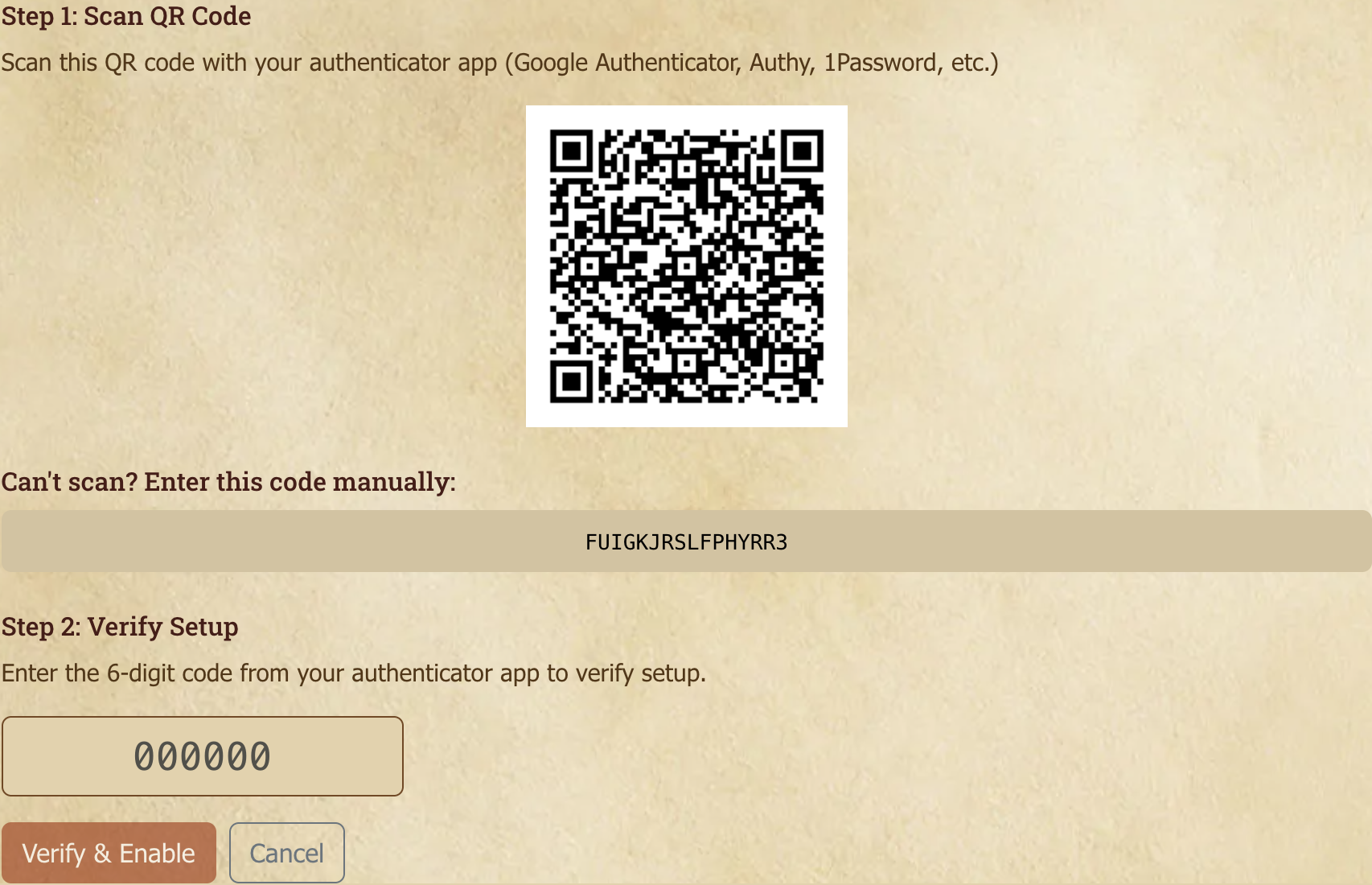
- Click Enable 2FA to reveal the QR code and manual-entry secret.
- Scan the QR code with your authenticator (or type in the secret).
- Enter the verification code to confirm.
Once enabled, every login asks for the TOTP after the password. If you lose your authenticator device, use Recovery Questions below to regain access — set those up now, before you need them.
What is TOTP?
TOTP generates a six-digit code every 30 seconds based on a shared secret (the QR code) and the current time. The server independently computes the same value and accepts the match. No network round-trip from the authenticator, and it works offline.
Password Change
Current password, then your new password twice.
Email Change
Your email address is where sign-in, notifications and password resets go, so changing it takes two steps on purpose.
- Account Settings → Security → Email.
- Enter the new address and your current password. The password is required even though you're already signed in — it's what stops someone who has walked up to an unlocked browser from redirecting your account.
- We send a confirmation link to the new address. Nothing changes until you click it, and the link expires after 24 hours.
- Click the link. The change takes effect immediately.
While a request is pending you'll see a banner showing which address is waiting, with a Cancel request button. Your existing address keeps working the whole time.
Two things happen when the change completes:
- We send a notice to your old address. There's nothing to click — it's a record, so that if someone else ever changes your address you still hear about it at the mailbox you control.
- All devices are signed out, including the one you confirmed from. Sign back in with the new address. This is deliberate: if the change was made by someone who had got into your account, this is what ends their session.
If the confirmation link says it's invalid or expired, your address has not been changed — just start again from the Email tab. If someone else claimed that address in the meantime, you'll be told so and can pick a different one.
Recovery Questions
A backup identity-verification mechanism if you lose access to your email and 2FA device. Pick from a set of stock questions and then provide answers. It'll help in the off chance anything happens!
Staying Signed In
Tick Remember me when you sign in and we'll keep you signed in on that browser for 30 days. Leave it unticked and you're signed out after a day — which is what you want on a shared or public computer.
The 30 days roll forward, they don't count down. Every time you come back, the clock resets to a fresh 30 days, so if you visit even once a month you should effectively never be asked to sign in again on that browser. The window only runs out if you stay away for the whole 30 days.
A few things end a remembered session early, all of them deliberate:
- Signing out. Signing out is a real sign-out — "Remember me" doesn't survive it.
- Changing your password, which signs out every other device, or changing your email address, which signs out all of them including this one.
- Signing that device out from Active Sessions below.
Still being signed out sooner than that?
The most common cause is the browser rather than us. "Remember me" works by leaving a cookie on your device, so anything that clears cookies ends the session — a browser set to clear cookies or site data on exit, "private"/"incognito" windows (which throw everything away when you close them), and some privacy extensions and cleanup tools.
Each browser and each device is remembered separately, so signing in on your laptop doesn't keep you signed in on your phone.
It's also worth checking Active Sessions: if a device you don't recognise is listed, treat it as a security matter rather than a nuisance and follow the steps there.
Active Sessions
Every device currently signed in to your account, with the browser and operating system, when it last did anything, when it signed in, and the IP address it connected from. The device you're reading this on is marked This device.
Use it when something looks wrong. If you see a device or location you don't recognise:
- Sign out that device — it loses access immediately.
- Change your password. Signing out a device does not change your password, so if someone else knows it they can simply sign back in.
Changing your password already signs out every other device on its own, so you don't need to do both in that order — but signing out first stops an active intruder sooner.
Sign out all other devices does what it says and leaves you signed in here. That's deliberate: if you're dealing with a suspected compromise you want the other party gone while you stay put to change your password.
Why a device might look unfamiliar
Phones and browsers report themselves inconsistently, and a device can appear more than once if you've signed in from more than one browser, or after clearing cookies. An unfamiliar location is a stronger signal than an unfamiliar device name — mobile networks in particular can place you in a different city.
Sessions that pre-date this feature show as Unknown device. They're still real sessions and you can still sign them out.
Username Rename
Username changes are possible via form request. Open the rename form, propose a new username, and the request enters a moderation queue. It's not instant, and approvals aren't guaranteed. The team takes impersonation seriously, but if your reason is genuine (moving away from a real-name handle, leaving an old persona behind), they generally go through.
Approved renames update your username everywhere; your old name is retired and reserved against future re-use.
Social settings
The Social section has four tabs:
- Friends — Your friends list.
- Requests — Pending friend requests; you can accept or decline them here.
- Privacy — Whether your online status is visible, who can send you direct messages, and who can see your friends list on your profile.
- Discord — Link your Discord account.
The full friends + DMs + presence guide lives in Community, Messages, and Social.
Notification settings
Notification Settings (sidebar or direct nav) is where you decide what gets pinged where:
- Per-type preferences (in-app, push, email, for each notification type)
- Per-game overrides (mute the casual game, keep your main campaign loud)
- Per-forum and per-topic settings (finer grain still)
- Push notification device management
- Email digest cadence (immediate, daily, weekly, off)
- Quiet hours
The full guide lives in Calendar, Events, and Notifications, where you can learn how to customize it to your preferences.
Theme
Myth-Weavers has several themes to enjoy. The theme switcher in the navigation lets you pick one; your choice is saved in your browser and applies on every visit.
Available themes
- Myth-Weavers — the default. Parchment background, leather chrome, the classic look.
- Midnight — a dark-mode theme based on Bootstrap dark, designed for late-night reading.
More themes will ship periodically; the dropdown in the navbar shows everything currently available. Feel free to try them out.
Switching
Click your current theme name in the navbar to open the picker. Pick another and the page reloads with the new theme applied. The choice persists in your browser's localStorage, but clearing browser data will reset it to the default theme.
URL parameter
For one-off previews (sharing a custom theme with someone, testing how content looks under a different theme), the ?theme=<name> URL parameter applies a theme on load and clears the parameter from the address bar. Useful for "try this look" links, but the user will need to go in and adjust their theme settings to make it permanent.
Custom themes
Account Settings → Advanced has a custom-theme JSON editor for the supporter-tier. Paste a theme definition, save, and it's available in your theme picker. Themes are validated on save; the Theme Guide game on the site covers the schema and how to contribute a theme back to the community.
Troubleshooting
Account Settings → Advanced → Troubleshooting has a Reset cached app data button. Use it if the site looks broken after an update — wrong theme colours, missing images or textures, a stuck "loading" state, or errors that a normal page refresh doesn't clear. Your browser sometimes holds onto an old, cached copy of the site; this clears Myth-Weavers' cached files and background workers and reloads a fresh version.
It's safe: you stay logged in, and it doesn't touch your settings or any unsaved drafts. If a problem persists even after resetting — especially on a work or school network — it may be a cache on your network rather than in your browser; mention that when you report it.
Calendar feeds
Calendar Feeds (sidebar) generates an ICS feed URL you can subscribe to from Google Calendar, Apple Calendar, Outlook, or any other ICS-aware app. Token-secured per-user; safe to plug into your phone's calendar.
RSS feed
Your RSS feed is a separate token-secured per-user URL that delivers updates from across the site to any RSS reader (Feedly, NetNewsWire, Inoreader, etc.). The feed mirrors your notification logic; items appear that you'd otherwise get a notification for (replies, mentions, new posts in topics you follow), in reverse-chronological order.
Generating the feed URL
Account Settings → RSS Feed has a Generate Token button. Click it and a feed URL is generated and displayed. Copy it into your RSS reader.
The feed delivers the last 50 items, sorted newest-first. Your reader polls the URL on its own schedule; new items appear as they're added.
Settings
- Include game advertisements — toggle to include recruitment ads in your feed. Off by default; useful if you're actively shopping for games and want them surfaced through your reader.
Token security
The feed URL contains a per-user token that grants read access to content you have access to. Treat it like a password:
- Don't share the URL, as anyone with it can read your private notifications.
- Regenerate Token revokes the current token and issues a new one. Any reader subscribed to the old URL stops working; resubscribe with the new one.
- Remove Token disables the feed entirely.
Supporting Myth-Weavers
Myth-Weavers is free to use. Donations keep the lights on and fund new development. Support Us (linked from Account Settings or the navigation) is the donation page.
How donations work
- Flexible amounts — Any contribution $1 or more, via PayPal.
- 30 days per dollar — Each $1 adds 30 days of active supporter status.
- Rolling tiers — Your supporter tier reflects contributions over the last 12 months.
Supporter tiers and benefits
Tiers are rolling-12-month thresholds. Higher tiers unlock more:
- Profile badge — A supporter badge next to your username in posts and on your profile.
- Higher upload limits & storage — Larger per-file uploads and a bigger storage quota (see Storage).
- Interactive maps — Create and use map canvases in your games. See Characters, Resources, and Maps.
- Integrations — Discord and Bluesky webhooks for your games. See Game Master's Guide.
- Custom themes — Profile appearance customization at higher tiers.
- Priority support — Faster turnaround on questions at the top tier.
Visibility settings
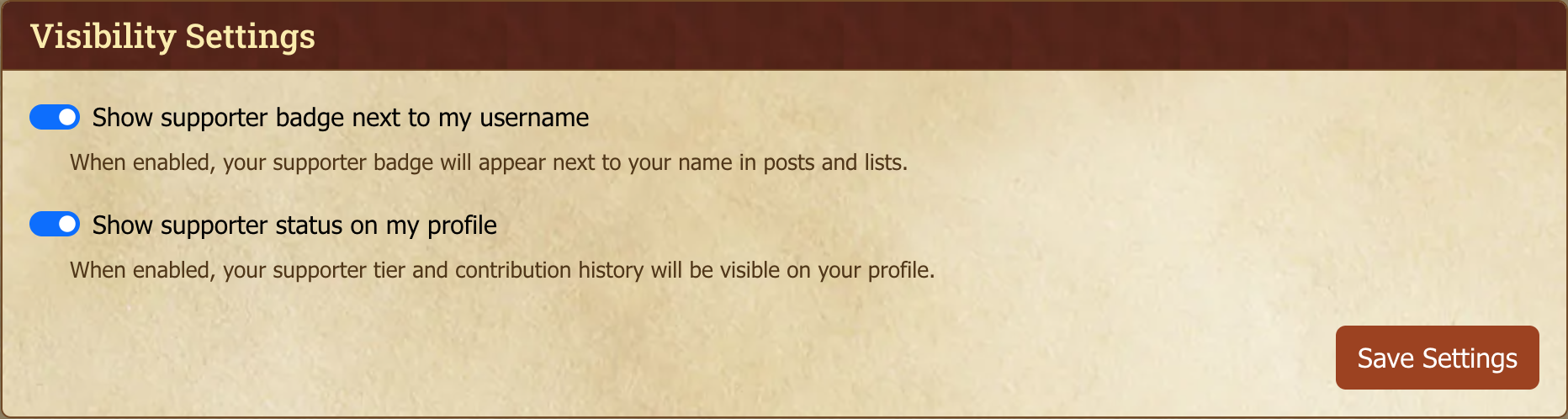
Active supporters can decide whether the badge and tier are visible:
- Show badge next to username — Toggle the supporter badge in posts and user lists.
- Show status on profile — Toggle your tier and how long you've been supporting on your public profile. Your renewal or end date and what you've contributed are never shown to other members; only you and site staff can see them.
Storage
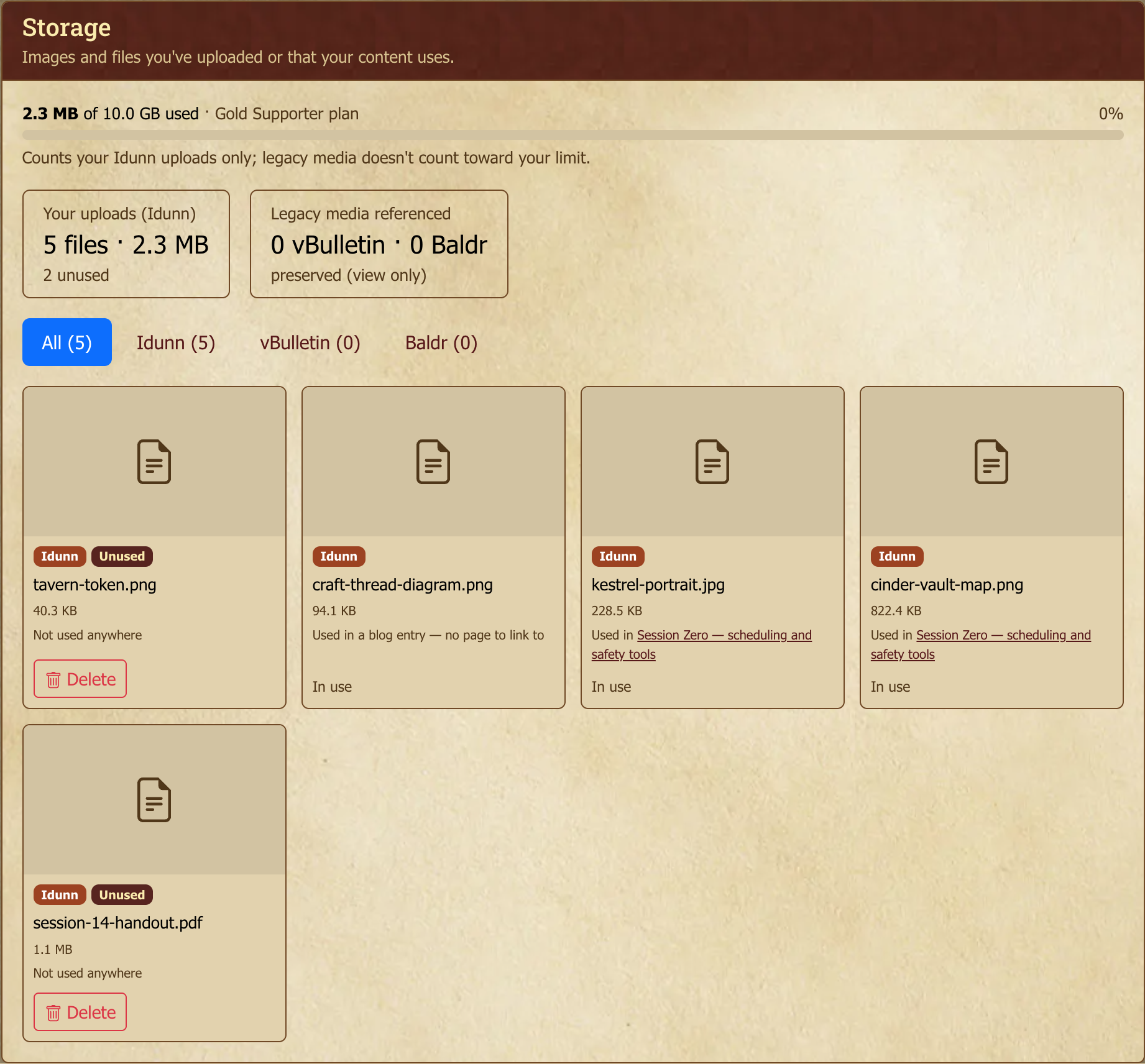
The Storage tab is where you manage everything you've uploaded, and shows how much of your quota you're using.
Usage meter — How much of your storage quota you've used. Only files you upload here (avatars, images, attachments) count toward the limit. Older images your posts reference from the previous forums do not count, and neither does anything you attached to a bug report.
Your quota — Free accounts get 500 MB. Supporter tiers raise it: Supporter 1 GB, Silver 2 GB, Gold 10 GB. If an upload would put you over your limit, it's blocked until you free up space. You can delete unused files here, or upgrade.
Per file — Each item shows its size, whether it's in use (and where) or unused, and a source badge. Delete removes an unused file after a 30-day grace period; you can Keep (undo) any time before then.
Where a file is used — Each in-use file names what's using it, and links straight to it where there's a page to link to. Maps link to the map, including a file used only by an overlay on it. Some things that use a file have no page of their own (a map token, a character portrait, a character template); those are named but can't be linked, and the entry says so rather than leaving you guessing. A file counts as in use whoever put it there — if another GM's game or somebody else's post uses an image you uploaded, your entry says so.
Files held as attachments — A file can be attached to a post or an advertisement without appearing anywhere in its text. When that's the only thing holding it, the entry says Attached to rather than Used in, because opening the post and looking won't show you the image. Deleting it from the text won't release it either — open the post or advertisement for editing and remove the file from the Attachments panel below the editor. The file then shows as Unused and can be deleted.
Bug report evidence is free — Screenshots and files you attach to an issue or a comment on the issue tracker do not count against your storage limit, and the Storage tab marks them free. Please don't delete them to save space: they're the evidence for the problem you reported, and we may still need them. A file that's used somewhere else as well — in a post, on a game page — still counts as normal, because it's doing a second job.
Files only other people's posts use are free — If you remove an image from your own post but someone else's post still shows it (usually because they quoted you), the file is kept so their post doesn't break, and it no longer counts against your storage limit. That's true even though your post's edit history still contains it: earlier versions don't count as you using it. If you edit the image back in, or roll back to a version that has it, it counts again straight away. The Storage tab marks it free — kept for other people's posts, and a summary card adds these files up. You can't delete it while their post uses it. A file that your own content also uses (a post, a game page, an attachment, a character template) still counts as normal.
Changing your mind about a deletion — A file waiting out its grace period still appears in the image picker, marked Deletion pending. Using it again cancels the deletion straight away, so the file you just placed isn't still queued to be removed. You can also press Keep on the Storage tab.
Files kept for post history — Editing a post keeps its earlier versions so the edit history and rollback still work, and those earlier versions still use the images they contained. A file in that situation says it's being kept for your history. This is deliberate — it isn't wasted space, and there's nothing you need to do about it.
Duplicate copies — If you uploaded the same file more than once, each copy is flagged. The earliest one is marked Original and the rest Duplicate, and a summary card shows how much space the extra copies are costing you. The Duplicates filter shows the whole set together, so you can see what a copy duplicates before removing it.
A duplicate that's still used somewhere can't be deleted — it shows In use with no Delete button, exactly like any other file in use. Removing a copy never breaks a post.
Legacy images — Images carried over from the old forums are shown for reference and are view-only (preserved, not deletable, and not counted against your quota).