
Issue Tracker
Myth-Weavers has a built-in issue tracker for bug reports, feature requests, support questions, and the long-running epics that span months of work. This guide covers filing an issue, voting on feature requests, tracking the work, and the resolution flow.
Filing an issue
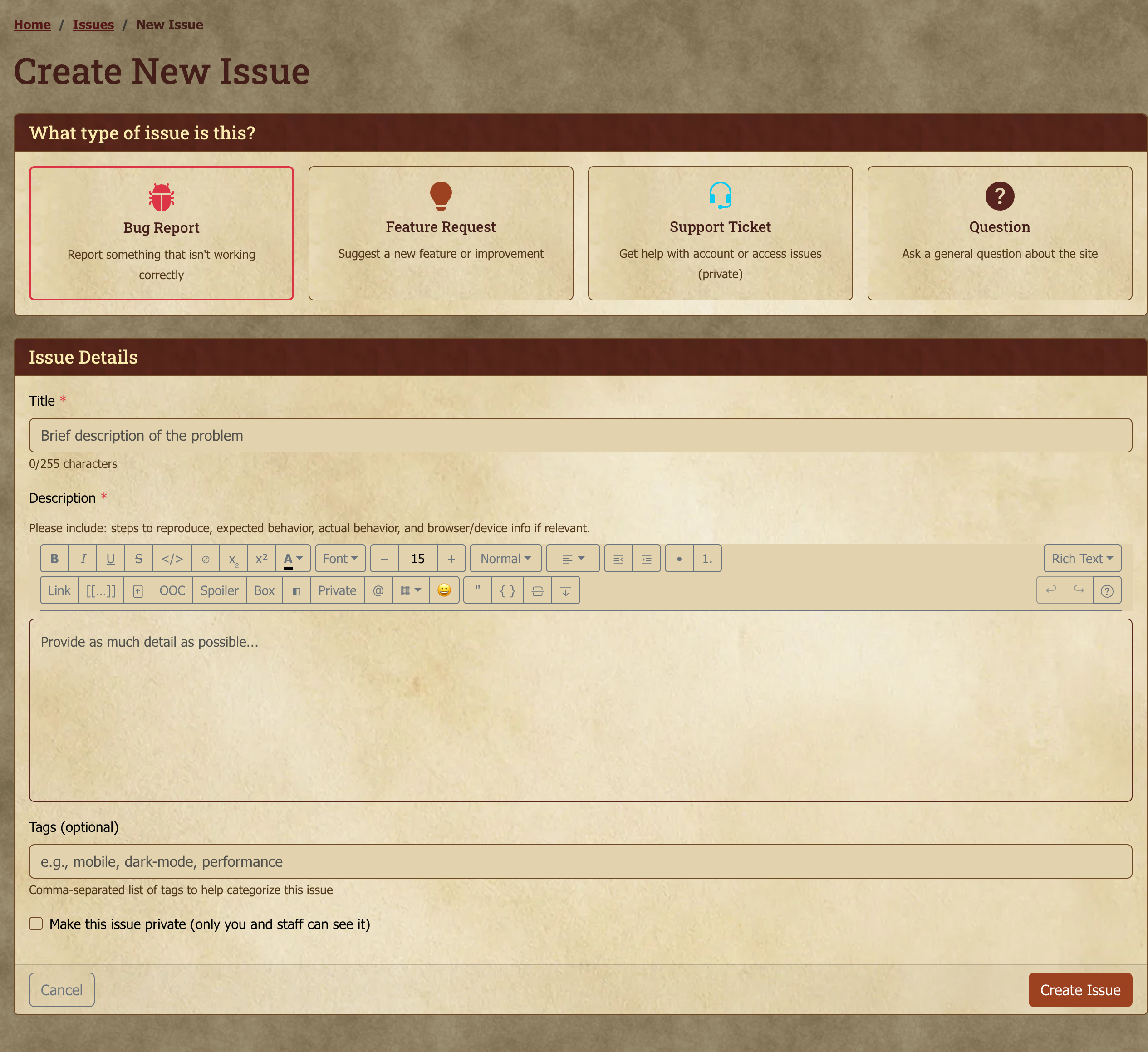
Issues in the navigation opens the tracker. New Issue opens the form:
- Type — what kind of issue:
- Bug — something is broken or behaving wrong
- Feature — a new capability you'd like to see
- Question — "how do I...?"; routed for answers, not implementation
- Support — account-related, sensitive game content, or "I need help with X that I'd rather not discuss in public"
- Epic — a large body of related work; usually created by staff
- Title — short and scannable; treat it like a commit message
- Description — what happened, what you expected, steps to reproduce (bugs); the use case + proposed shape (features)
- Tags — optional, comma-separated; the autocomplete suggests existing tags (see Tags)
If your issue grew out of a specific post, whether it's a bug you spotted mid-game or a feature idea sparked by something you read, the Report Issue action on that post's menu pre-fills the form with a link straight back to the source.
Filing from Discord
Plenty of problems get described in Discord first, and re-typing the whole thing into a form is the reason a lot of them never get filed at all. You don't have to.
Right-click (or long-press on mobile) any message in the Myth-Weavers Discord, then choose Apps → File as Myth-Weavers issue. A short form opens with the title already filled in from the message; adjust it, set the type, and add anything the original message left out. The bot posts the new issue's link back into the channel so everyone in the conversation can follow it.
A few things worth knowing:
- You need a linked account. The bot has to know who you are before it will file anything. If you haven't linked yet it'll point you at the verification page; it's a one-time step.
- The issue belongs to whoever wrote the message, not to whoever filed it. If you file someone else's report, they become the reporter — they hit the problem, so they're the one who can answer follow-up questions and sign off on a fix. Your name is recorded on the issue as the person who filed it. If the author has never linked their Discord account, the issue falls back to you instead.
- The original message comes along, with a link back to it in Discord.
- Anything that looks like a password token or an email address is stripped out before the issue is created. Support requests in chat often contain more than people intend, and issues can be publicly readable.
- Support-type issues are private automatically, visible only to the reporter and site staff — same as filing one on the site. If you filed it for someone else, that means they can see it and you may not, unless you're staff. The bot tells you in the channel when that happens.
Priority (Critical / High / Medium / Low) isn't something you set — staff assign it during triage, from the issue's own page. It shows as a badge once set, and you can filter and sort the issue list by it.
Statuses
Once filed, an issue travels through a workflow:
| Status | Meaning |
|---|---|
| New | Filed, not yet reviewed by staff. |
| Triaged | Staff have seen it and confirmed scope. |
| In Progress | Someone is actively working on it. |
| Resolution Proposed | A fix has shipped or a decision has been made; awaiting your sign-off as reporter. |
| Resolved | You (or staff) accepted the proposed resolution. |
| Closed | Resolved or otherwise complete; not actively tracked. |
| Reopened | Was resolved, but came back; back in the active queue. |
| Awaiting Input | Staff need more information from the reporter or another stakeholder. |
As the reporter, the status to keep an eye out for is Resolution Proposed. That's your cue to check the fix or decision and either Accept it (which moves the status to Resolved) or Reject it (which moves it to Reopened, for another look).
You can answer right where you write your reply: under the comment box, Comment and approve posts your comment and accepts the fix, and Comment and reject posts it and reopens the issue. A plain Post Comment leaves the decision open — handy for asking a question first — and puts the issue back in front of the team. If you don't respond either way, the issue is automatically resolved after 7 days with no further activity — you can always reopen it if the problem resurfaces.
Voting on features
Feature requests and epics accept votes. The vote count is shown on the issue card; clicking the vote button toggles your vote. Higher-voted features get attention earlier — voting is the lightweight way to signal "yes, I want this too" without writing another duplicate issue. An epic gathers related requests under one theme, so a vote on an epic says which theme you'd like worked on next.
Bug and support issues don't take votes, since severity is a staff judgment call.
Comments
Every issue has a comment thread, open to anyone with read access to the issue. Staff can also leave internal comments that only other staff can see, which keeps triage notes and back-channel discussion from cluttering the public conversation.
Editing and deleting your comments
Each comment carries an ⋮ actions menu in its top-right corner:
- Edit — reopens the comment in the editor. Any files already attached to it come back with it, so you don't need to re-upload them. Edited comments are marked edited for everyone.
- Delete — removes the comment from the thread, after a confirmation prompt.
You can edit and delete your own comments; staff can do both on any comment.
Removing an attachment while editing takes effect when you save. If you change your mind, cancel the edit and the file stays where it was. This is true across the site's editors, not just issue comments.
Promoting content into an issue
Two staff actions turn something someone already wrote into a tracked issue. Both create the issue on behalf of the original author, so they show up as the reporter and get the follow-up notifications — rather than the staffer who filed it.
- Create Issue from Post — on a forum post's actions menu. Useful when a bug report lands in a discussion thread instead of the tracker. By default it also leaves a reply in the topic quoting the post and linking to the new issue; you can turn that off for threads that shouldn't be interrupted, such as in-character games.
- Split into New Issue — on an issue comment's ⋮ menu. Useful when someone "me too"s an existing issue but is actually describing a different problem. By default it leaves a comment on the original issue linking to the new one.
In both cases the original post or comment stays exactly where it is — nothing is moved or removed. The source content becomes the new issue's description, with a link back to where it came from. Files attached to the source (a PDF or log, say) are attached to the new issue too, and they stay on the original as well. Images shown inside the text come across with the description.
If the source is a staff-only comment, the new issue defaults to private so the discussion doesn't become publicly readable by promotion.
Browsing and search
The issue list (the Issues page) is sortable and filterable:
- By type (bug, feature, question, support, epic)
- By status (any of the workflow states above)
- By priority
- Free-text search across titles, descriptions and comments — so a detail someone mentioned in a reply is findable, not just the original report
Each row shows status, type, priority, title, vote count (for features and epics), and last-activity timestamp.
Tips for filing
- Search before filing. Duplicates split the conversation and dilute votes. The tracker's search covers titles, descriptions and comments, so a problem already discussed in a reply will turn up — 30 seconds well spent.
- One issue per concern. If you find two unrelated bugs in the same session, file two issues; they triage separately.
- Be specific in bug reports. "It's broken" is hard to act on; "When I click X on Y page, I expected Z but saw W" is much easier. Include the URL and your browser if relevant.
- Feature requests benefit from use cases. "Add a dark mode" is harder to scope than "I read late at night and the bright theme strains my eyes; could there be a dark variant?" — the second framing makes the design problem concrete.
Next steps
- Community, Messages, and Social — community forums are the right venue for discussion that isn't quite an issue.
- Account Settings — notification preferences for issue updates land in the general notifications panel.