
Finding and Joining a Game
At any given moment, several hundred active games are unfolding on Myth-Weavers, spanning dozens of systems and just about every genre anyone's ever put to paper. Think of this guide as your map: where to look, what to look for, and how to actually get yourself through the door.
The home page
Once you're logged in, the home page is your hub, and it's built around three main areas.
My Games sidebar
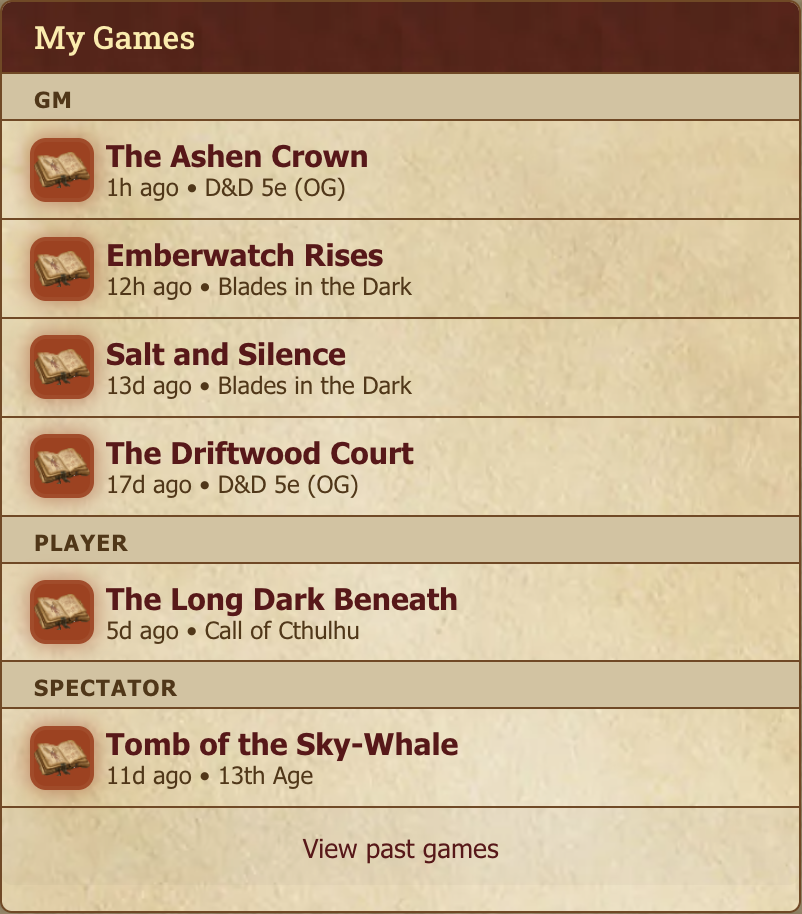
Down the left side sits every game you're currently part of, each one tagged with your role (GM, Assistant GM, Player, or Reader). Click to jump in.
A game with posts you haven't read yet has its icon lit up; games you're caught up on are dimmed. Games are ordered by their most recent post that you can see, so activity you don't have access to never pushes a game up the list.
It lists games you're actively playing only — finished ones would swamp it. View past games at the bottom opens your game history.
Advertisement carousel
Running across the top of the main column, the Advertisement Carousel cycles through games that are actively recruiting. Spot something that catches your eye? Click the ad to see the full story.

Community forums
Below the carousel: the Community Forums — site-wide discussion categories (General Discussion, Tabletop RPG, recruiting talk, etc.). Open to all members, not tied to any specific game. See Community, Messages, and Social for what's there.
Who's Online
Bottom of the home page: who's currently active.
The Dashboard
Dashboard in the navigation gives you a personal overview:
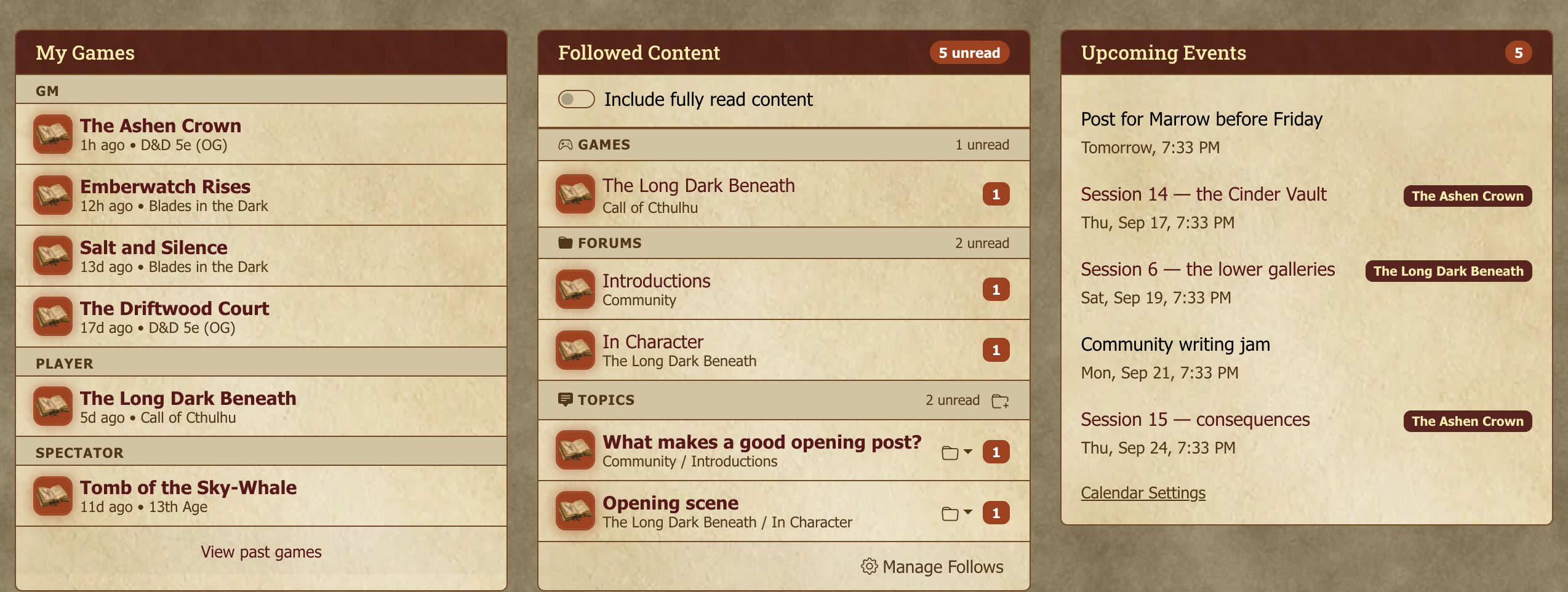
- My Games — Same list as the home sidebar.
- Followed Content — Games, forums, and topics you follow, with unread counts. One click takes you to the first unread post. It shows your currently active follows by default — things in games that are still running — so a handful of live follows aren't buried under a long tail of old ones. Follows in archived or completed games (often character sheets you watched long ago) are tucked behind a Show archived follows link at the bottom of the Topics list; click it to browse or jump to any of them.
- Upcoming Events — Events from your personal, game, and community calendars coming up soon.
- Recent activity in my games — The most recently active topics across the games you're in, each showing the latest post and reply count. Off by default — turn it on with Customize.
Click Customize (top-right of the Dashboard) to choose which widgets appear and drag them into the order you want. Your layout is saved to your account.
The Game Directory
Games in the navigation opens the Game Directory, every single game on the site, laid out for you to browse.

By default it surfaces the games that are actively recruiting, which is exactly the view you want when you're on the hunt for somewhere to play.
Filtering by status
Three buttons narrow the list:
- Recruiting — games currently accepting applications. The default.
- Active — games being played, whether or not they're recruiting.
- Inactive — games that have stopped, whether the GM marked them Completed or they were Archived.
"Inactive" covers both endings deliberately. A game that wrapped up and a game that was archived are equally finished from a player's point of view, and most people looking for an old game don't remember which of the two happened.
Alongside those, Mine limits the list to games you're part of — and when you pair it with Inactive, that includes games you've left, not just ones you're still on the roster of. That pairing is the quickest route to a game you played years ago.
Filtering by game system
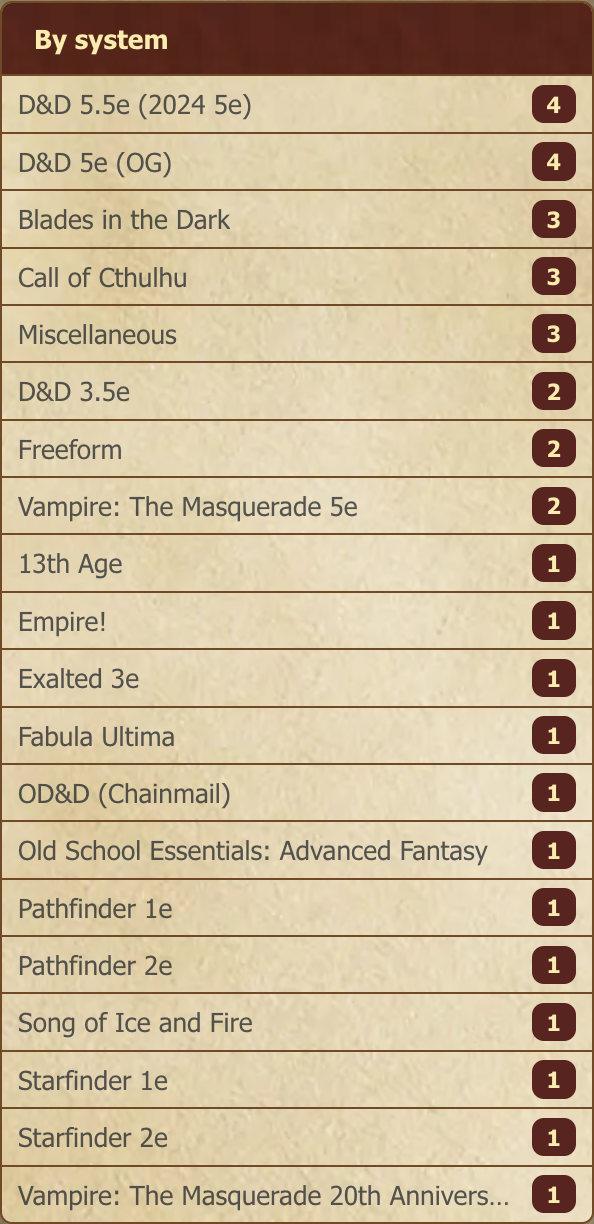
Down the left of the directory, By system lists the game systems in play with a count beside each one. Click a system to narrow the list to it; click it again (or Clear) to go back to everything.
The counts follow whatever else you've already set. Switch to Recruiting and the numbers become "how many games in this system are looking for players right now" — which, if you know you want Pathfinder and don't much mind what else, is the fastest route to a table.
Every system with a matching game is listed, not just the popular ones. The long tail is the useful part: a system with two games running is one you'd never find by paging through the directory.
Sorting
The dropdown sorts the results, and every option has both directions:
| Sort | Use it when |
|---|---|
| Most Recently Active / Least Recently Active | You want the liveliest games, or the ones that have been quiet longest |
| Newest First / Oldest First | You're looking for something from a particular era |
| Alphabetical (A–Z) / (Z–A) | You half-remember the name |
| Most Members | You want a bigger table |
If you're hunting for a game from a specific year, Oldest First combined with Inactive is usually the fastest way in — there are more than 24,000 archived games, so scrolling back through "most recent" will not get you there.
System pages
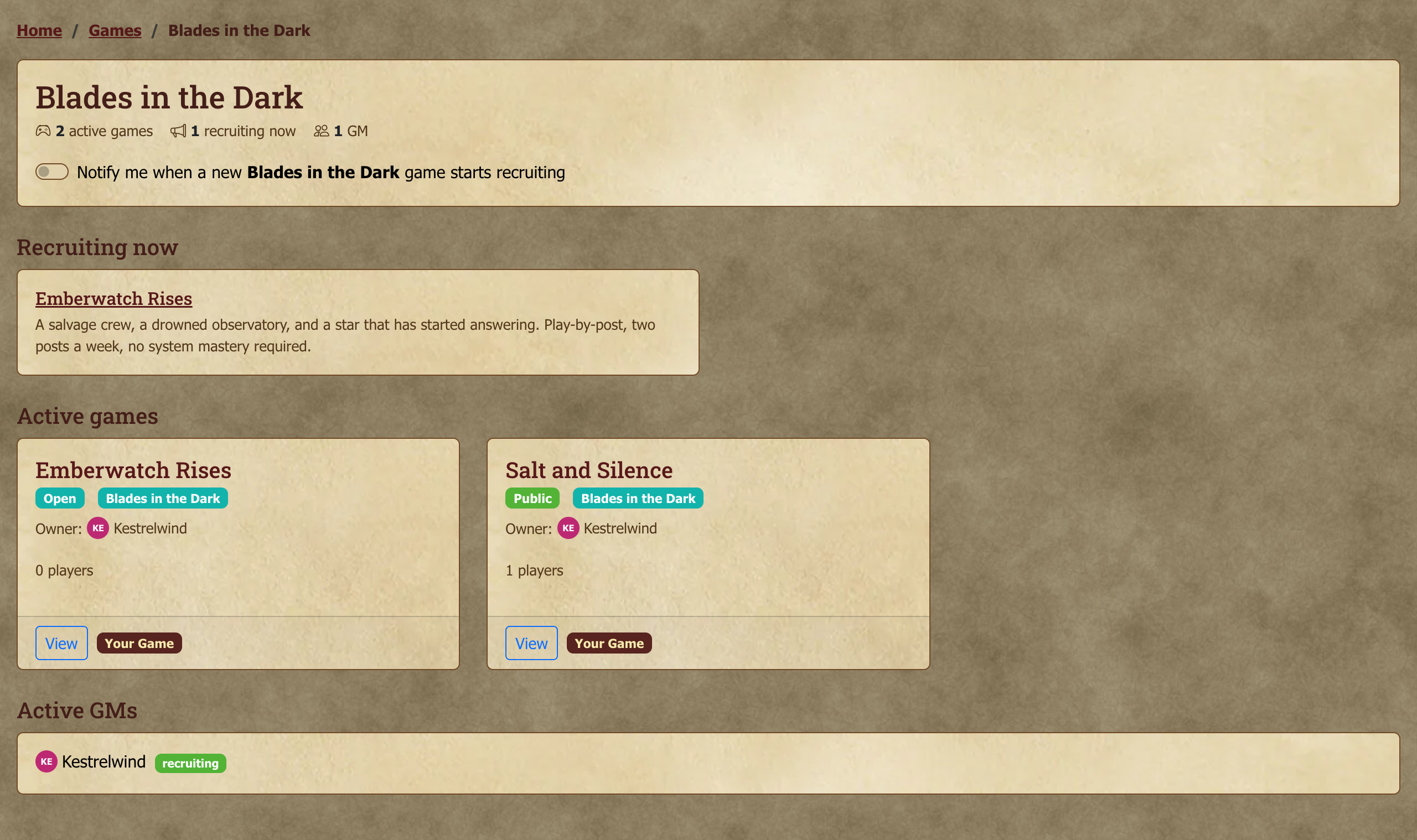
If you already know what you want to play, start from the system rather than the directory. Every game system has its own page gathering everything tagged with it:
- Recruiting now — open advertisements in that system.
- Active games — what's currently being played.
- Resources — pages and downloads written for that system.
- Active GMs — who's running it, with anyone currently recruiting listed first.
Each section links through to the full, filtered list, so the page is a starting point rather than somewhere you get stuck.
There are two ways in. Click any system tag — the coloured badge on a game card, a directory row, or an advertisement — and the box that opens has a Browse this system link at the bottom. Or pick a system in the directory's By system sidebar and use the Browse this system link there.
The same box (and the top of the system page) carries the notify me toggle described in Calendar and Notifications — turn it on and you'll hear about new games in that system as they start recruiting.
A system nobody's playing yet still has a page; it will simply tell you so, and offer to let you start the first game.
Game statistics
The Game Directory has a Statistics button that opens a site-wide view of every active game at once — the same data the directory shows, but aggregated rather than browsed.
It reports:
- Total Active Games and the Median Age of them, in months.
- Active Games by System — how the active population divides across systems, which is the fastest answer to "does anyone here actually play this?"
- All Active Games — a full table with each game's system, age, post count and player count.
The median age is the number worth looking at. Play-by-post runs on a timescale that surprises people arriving from tabletop: the oldest active games on the list have been running for seventeen years and tens of thousands of posts. A game that has been going four years is not unusual here.
Two practical uses when you're picking a game:
- Sanity-check a system before committing. If a system has three active games site-wide, a game in it may be your only shot for a while — worth knowing before you pass on it.
- Read post count against age. A game with 8,000 posts over six years and one with 8,000 over eight months are very different commitments. The table lets you compare that directly, which a single game's page doesn't.
Statistics covers active games only, so it's a picture of what's running now rather than a history of the site.
Finding games you've played before
Every game you've ever been in is listed on the Games tab of your profile. Get to it from:
- your profile, where Games is the tab it opens on, or
- the My Games widget on your dashboard, via View past games, or
- directly, at
/users/<your-username>/games.
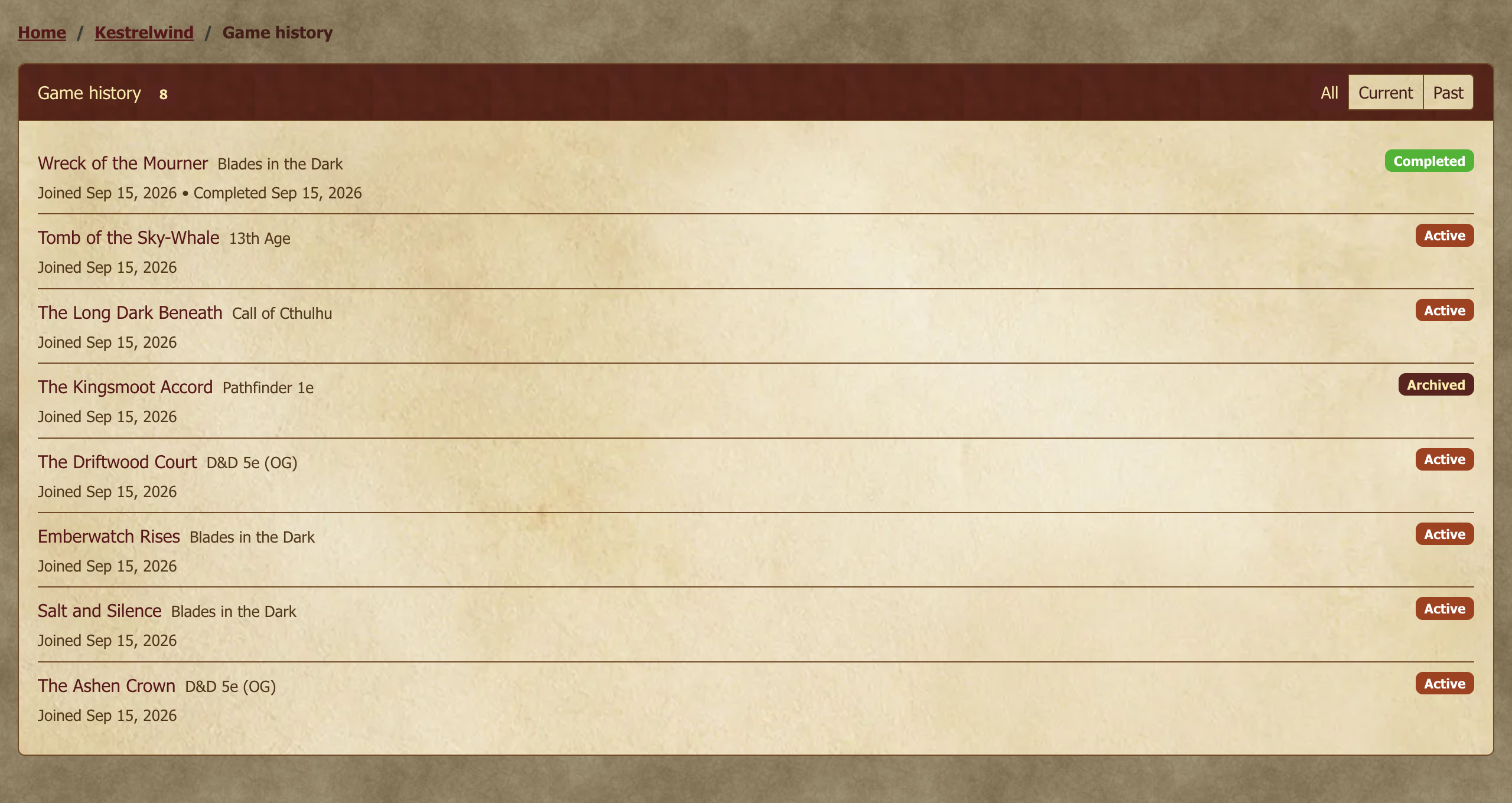
The tab opens on your Current games; the Past and All buttons switch to the rest, and each button shows how many there are. Games are listed newest first, with a badge for your role and one showing what happened to each — Active, Completed, Archived, or Left — plus the dates you joined and (where it applies) left. Long lists are split into pages.
"Past" means either the game ended or your membership did: a game that finished while you were still on the roster and a still-running game you walked away from both count. Every membership is listed, however few posts you made, so a character you played twice or a game that fizzled after a month is still there.
Other people can see your game history too, the same way they can see your profile. Private games are the exception: those appear only to people who were in them, and to site staff.
Viewing an advertisement
Any game that's currently recruiting shows a View Ad button — on its card in the Game Directory, or from the homepage's Advertisement Carousel. Click it to open the game's Recruitment tab with the full pitch:
- Game name, system, genre
- The GM's pitch and what they're looking for
- Current player count and max players

If the GM has set an expected posting frequency (multiple per day, 1–2 per day, every few days, weekly, casual), it shows as a badge on the game's own page. Worth treating as load-bearing before you apply: "multiple per day" and "weekly" are radically different games — pick one that matches your own rhythm or you'll be perennially behind.
Applying
When you find one you like:
- Click the ad or the game name to land on the game's Recruitment page.
- If the game is recruiting and you qualify, an Apply Now button appears at the bottom.
- Click it. The application form opens with whatever prompts the GM has set up.
- Fill it out (character concept, sample post, anything else the GM asked), then submit.
Your application creates a private discussion thread between you and the GM. From there it's a conversation: questions, character concept iterations, sample posts, whatever the GM and you want to work through before a yes/no.
Some games have a Join button instead. Public and open games let anyone join without GM approval, and that stays true while they're recruiting — so on those you'll see Join Game rather than Apply Now, and you don't need anyone's approval to get in. While the game is recruiting, clicking Join asks how you'd like to come in:
- Join and post an application takes you to the application form. When you submit it, you join as a player, and your application stays open as the place to introduce yourself and your character, where the GM can reply.
- Just join puts you straight in, with nothing to write.
Choose at that point: once you're a member, you can't add an application later. The advertisement is still worth reading for what the GM expects of players, but it isn't a gate.
If you see "You cannot join this game," someone on the game's GM team has blocked you, and you won't be able to apply or join.
You'll need a verified email address to join or apply. If you haven't clicked the link in your welcome email yet, the site will ask you to do that first. The banner at the top of the page can resend it. Accepting an invitation a GM sent you works either way.
Under the hood: what applicants can see in a game
By default, applicants get member-level read (and sometimes post) access to the game's forums and resources while their application is open — the GM controls this in the advertisement's settings. This lets you read existing posts and get a feel for the game before committing. If you're rejected or withdraw, that access goes away when recruitment closes.
A GM can also open a recruiting game to anyone who can see the advertisement, so you can read the forums and resources before deciding whether to apply. You still need to be signed in, and the access ends when the advertisement does.
Tracking your application
There's no separate "my applications" list. Your application is a private discussion thread inside the game, and an Application Panel at the top of that thread shows the current status:
- Pending — GM hasn't decided yet.
- Approved — You're in. Welcome.
- Rejected — GM passed; they may have included a message explaining why. (Not personal — most GMs are juggling more applicants than slots.)
- Withdrawn — You pulled the application yourself.
Two ways back to that thread: the game shows up under My Games → Applicant while it's open, and any GM activity on it (a decision, a reply) triggers a notification.

Accepting a game invite
GMs can also invite specific players directly. Invites show up in your Notifications. Click through to view the game and accept or decline.
Tips for the first application
These are a few tips that help get your application seen:
- Read the ad carefully. GMs who write detailed ads notice when applicants didn't read them. Make sure that you're addressing what is being asked for.
- A character concept beats a stat block. Most GMs care more about who your character is than the optimal build. Give them a background that feels meaningful.
- Don't apply to ten games at once. Quality of fit beats volume. Pick two or three that genuinely excite you and put effort into those applications.
- Posting frequency is real. If the ad says "1–2 per day" and your life can only do "1–2 per week," apply to a different game. Both of you will be happier, and there are plenty of games that fit your posting schedule.
Next steps
Once you're in: Forums, Topics, and Posting is the orientation to the game-page interface. The Post Editor is the reference for how to write things. Characters, Resources, and Maps covers linking a character sheet to the game.