
Campaign Calendars
A Campaign Calendar is an in-world calendar: the days, weeks, months, and years of your campaign's setting. Distinct from the real-world calendar (which tracks your actual sessions and deadlines), the campaign calendar is the fictional time your characters live in.
Useful for any setting with non-standard time:
- Fantasy worlds with their own month names and year designations
- Sci-fi settings with longer or shorter day-night cycles
- Historical games where the table wants to track exactly when their characters' grandfather rode out for the Sixteen Years' War
Setting it up is the GM's job. Once it's ready, both the GM and players can view it, and any events you mark on its dates will surface in your summary views.
Creating a campaign calendar
[GM]
From your game's Resources tab, choose + Create → Campaign Calendar, and the calendar is linked to the game. You can also make one on its own from the header's Resources menu → Campaign Calendars, then link it to games later. The setup form walks you through:
- Title — what the calendar's called (e.g., "Faerûn Reckoning" or "Empire Standard Time")
- Days per week — most settings use 7; some use 5, 8, or 10
- Weekday names — one name per slot (Sun, Mon, Tue, ...; or Hammer-day, Forge-day, Quench-day, whatever the setting wants)
- Month structure — for each month, a name and a day count. Months can be uneven (28, 29, 30, 31, whatever the lore demands). Festival days that belong to no month can sit between them (see Leap years and festival days)
- Leap years — optional. How often a leap year comes, and which months gain days in one
- Seasons and moons — optional (see Moons and seasons)
- Epoch label — what years are counted from (e.g., "Dale Reckoning," "Year of the Empire," "After the Collapse")
- Year-one weekday — which weekday year 1 begins on (the grid is derived from this anchor)
- Color legend — optional. Say what each event color means (see Color legend)
Don't worry about matching real-world structures, the configuration is completely up to you. A 5-day week with three 100-day months works just as well as a standard 12-month, 365-day Gregorian setup.
Quick start buttons fill the form in from a ready-made calendar. A new calendar starts from Earth. Change anything afterwards.
- Earth (Gregorian), with real leap years and real weekdays
- Forgotten Realms (Harptos), with its festival days and Shieldmeet
- Greyhawk (Common Year), with its four festival weeks and the moons Luna and Celene
- Eberron (Galifar), twelve 28-day months
- Golarion (Absalom Reckoning), with a leap day in Calistril every fourth year
- Exandria, eleven months and 328 days
- Warhammer (Imperial Calendar), an 8-day week, six holidays outside the week, and the moon Mannslieb
The quick starts set up the months, week, leap years and moons. Moons are included only where the setting's books give their cycle.
Using a quick start on a calendar you already have replaces its months, week, leap years, seasons and moons when you save. Its events stay, but they may land on different weekdays.
Your own presets
To reuse a calendar you've built, open its Settings and use Save as Preset. The preset keeps the calendar's months, week, leap years, seasons, moons, color legend and eras. It then appears under Quick start → Yours whenever you create or edit a calendar. Starting a new calendar from it also creates its eras; on an existing calendar, add eras on the Eras tab.
A preset is a copy, so later changes to the calendar don't change it. Only you can see your presets, and you can delete one with the × beside its name. You can keep up to 50.


Leap years and festival days
[GM]
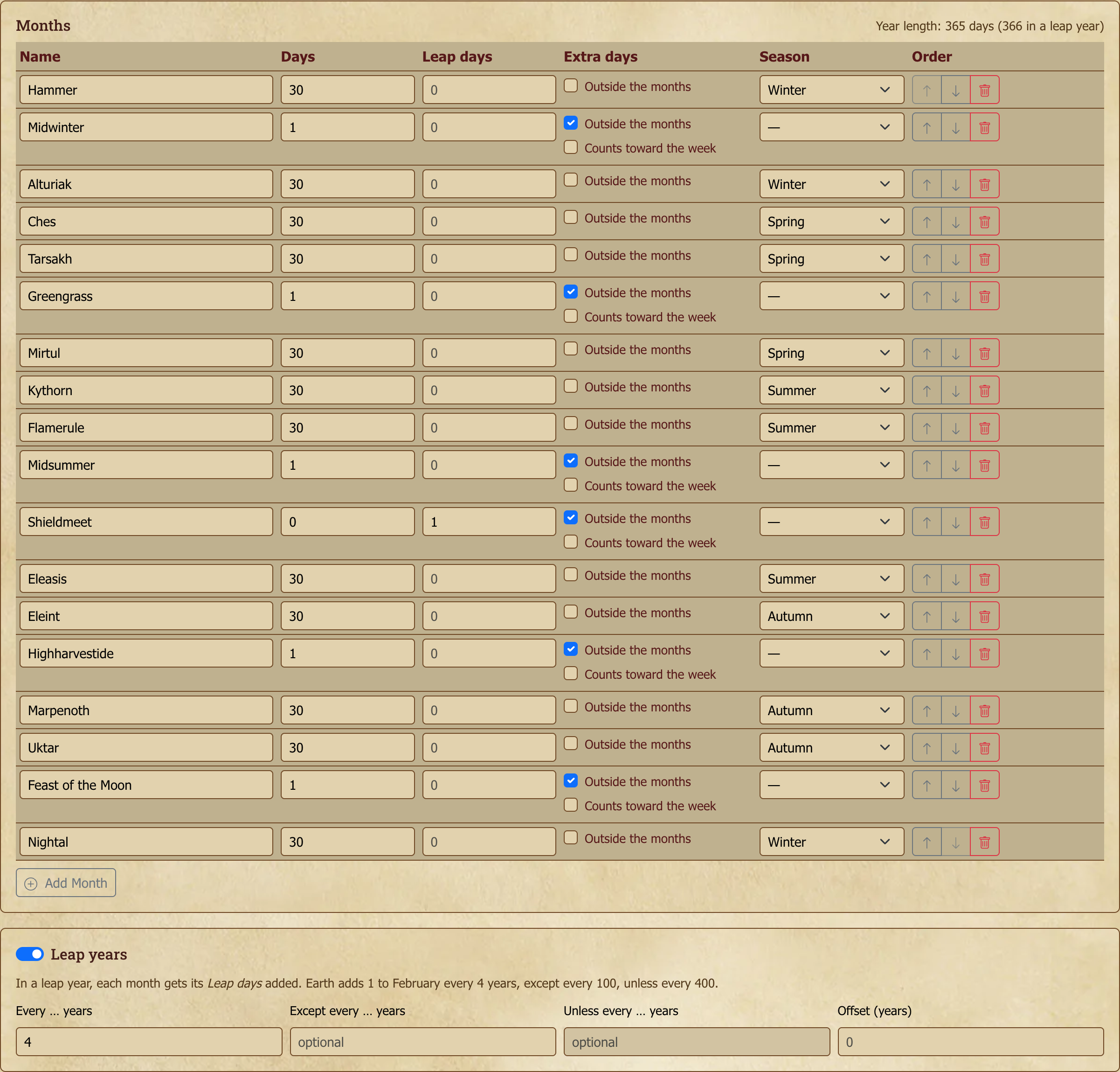
Leap years. Turn on Leap years in the calendar's setup and say how often they come: every 4 years, say, with optional exceptions. Earth's rule is every 4 years, except every 100, unless every 400. Then give each month that grows in a leap year its Leap days (Earth gives February 1). The calendar shows those extra days only in leap years, and the weekdays follow on correctly.
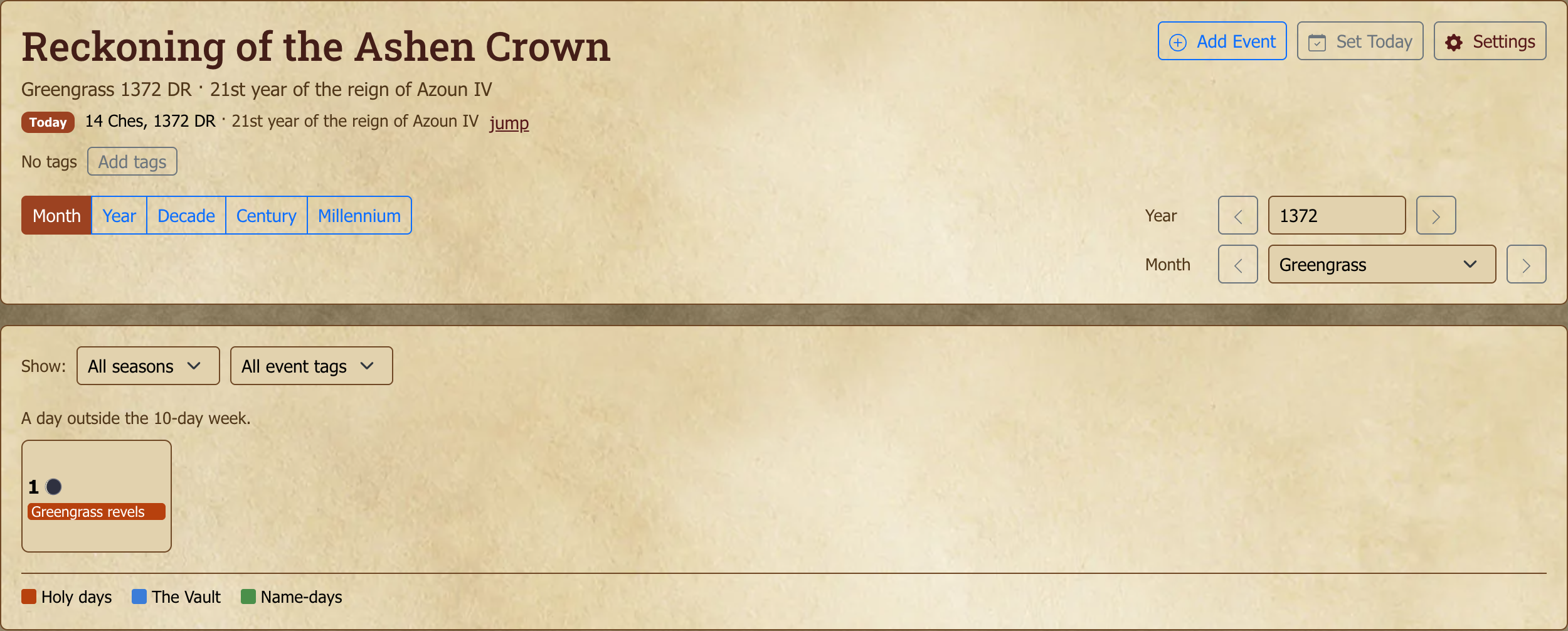
Festival days. Some settings have days that belong to no month, like the five festivals of the Harptos calendar. Add a month for the festival, tick Outside the months, and use the arrows to move it between the months it falls between. By default a festival day sits outside the week, so the weekdays carry on after it as if it weren't there. Tick Counts toward the week if your setting's festival days do have weekdays.
A festival that happens only in leap years, like Harptos' Shieldmeet, is a festival with 0 days and 1 leap day. In other years the calendar says it doesn't occur that year.
Turning leap years on for a calendar you already use can move the weekdays of dates after year 1, because the extra days now count. Existing calendars keep their weekdays until you change them.
Moons and seasons
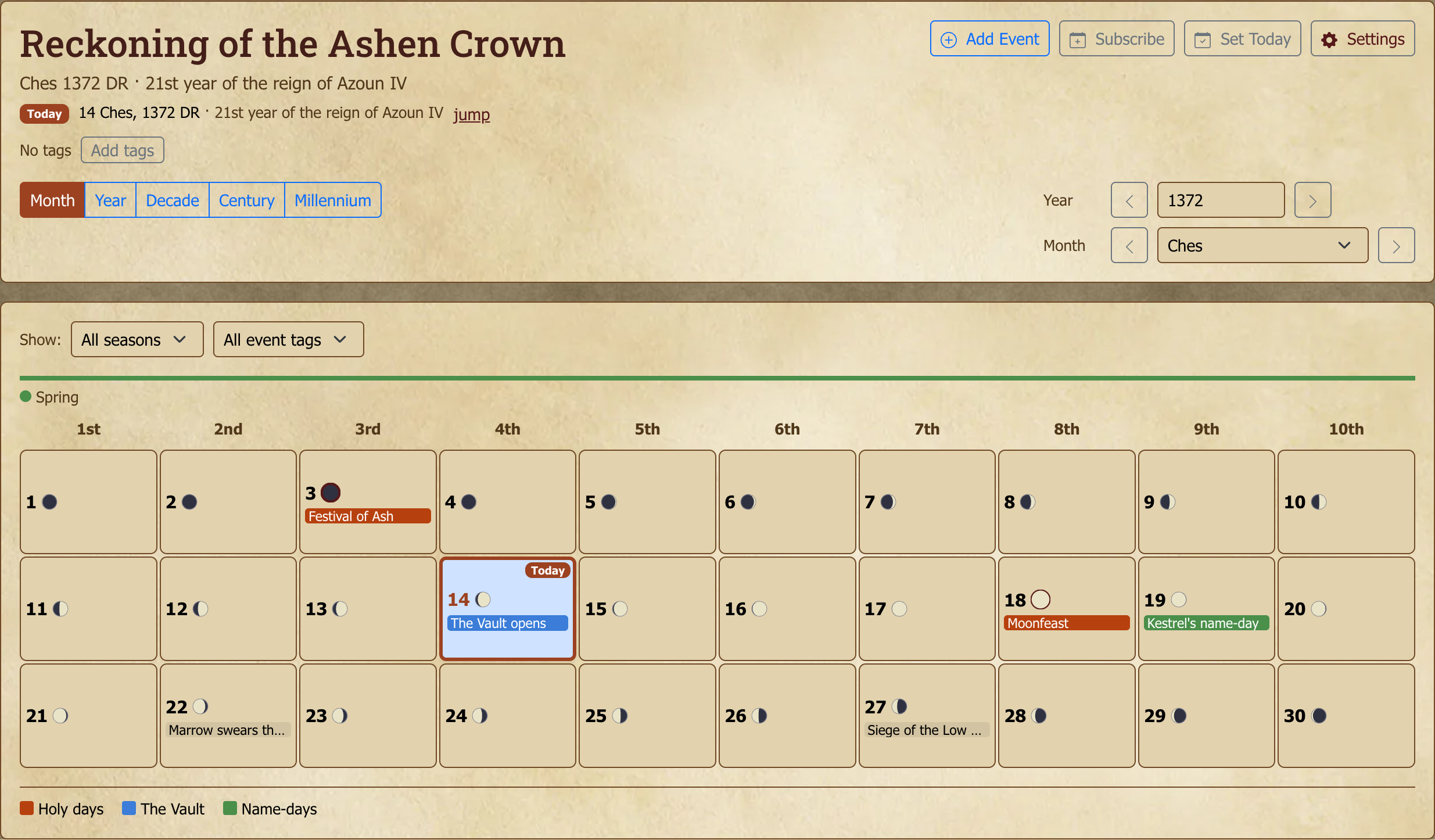
Every day in month view shows each moon's phase, from new (dark) through full (bright) and back. The exact day of a new or full moon is ringed, and hovering a moon names its phase. Above the grid, the month's season appears in its color.
[GM]
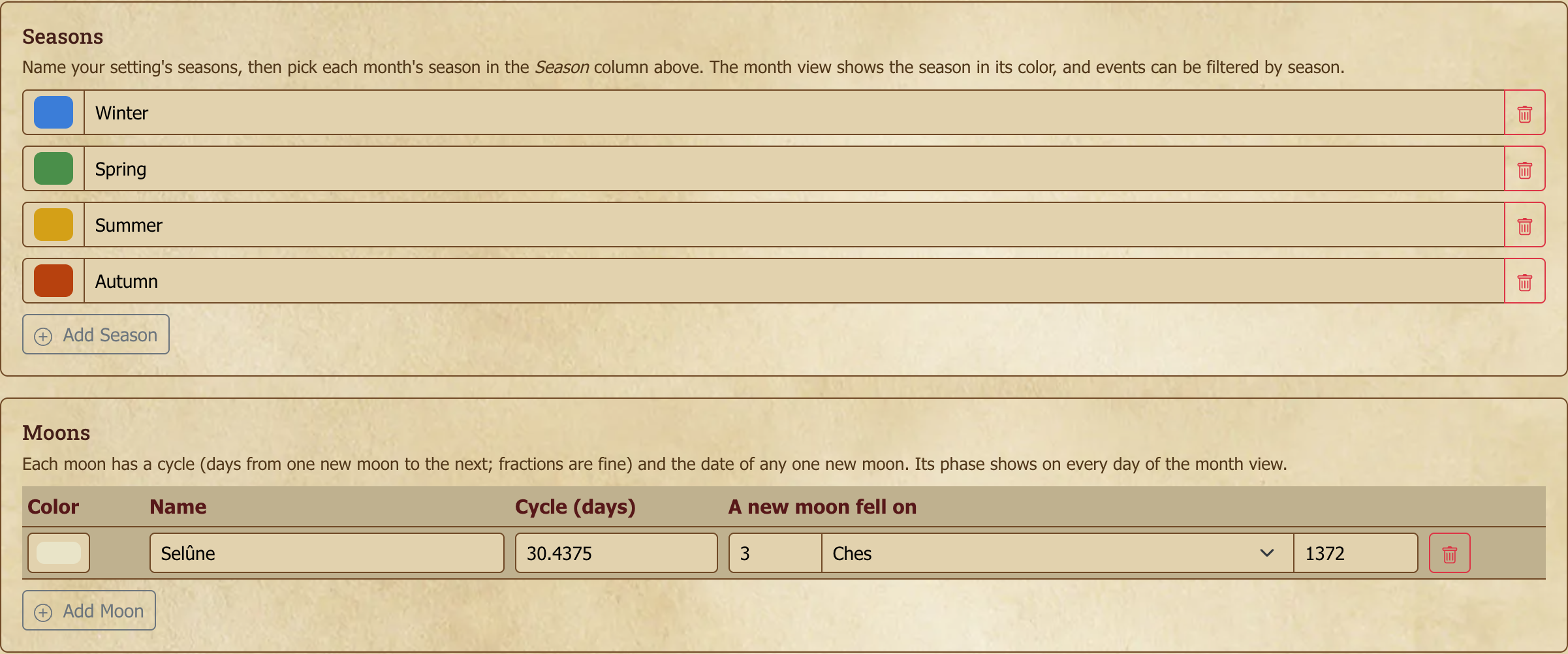
Moons. In the calendar's Settings, under Moons, choose Add Moon and give it a name, a color, its cycle (the days from one new moon to the next; fractions such as 29.5 are fine) and the date of any one new moon. The calendar works out every other phase from those. A calendar can have up to 8 moons.
Seasons. Under Seasons, add your setting's seasons and give each a color. A Season column then appears in the month table, where you choose each month's season.
Events that repeat with a moon, and filtering by season, are covered under Events.
Viewing the calendar
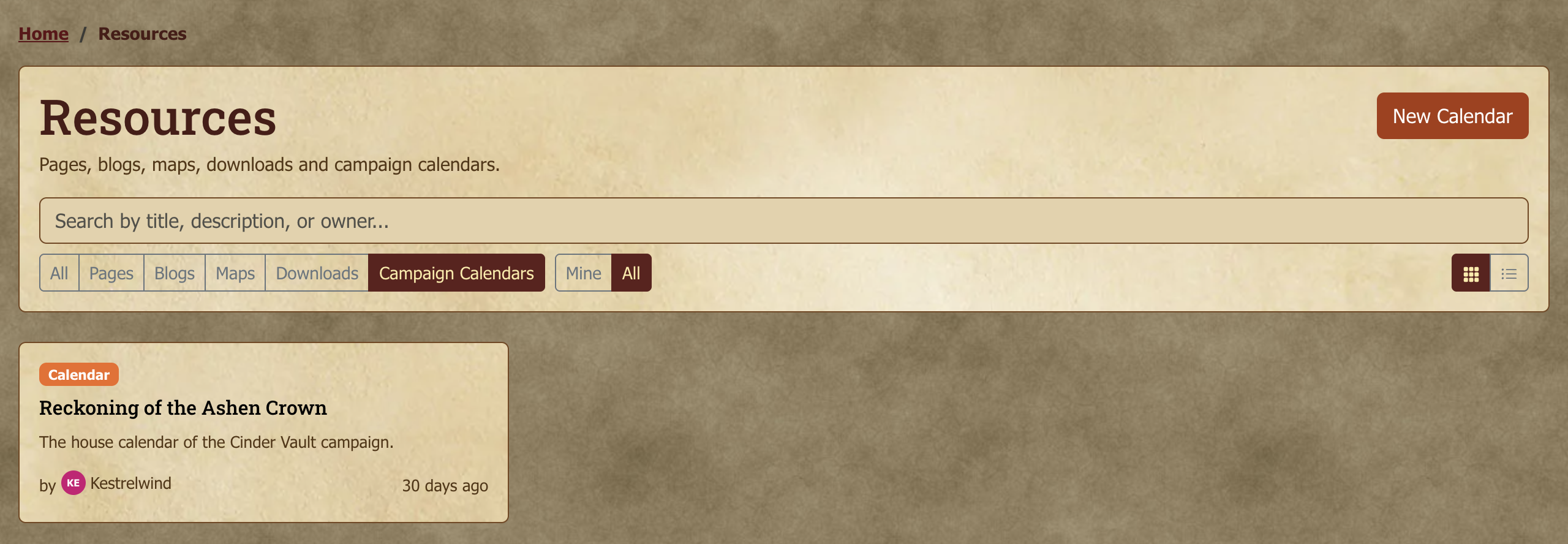
A game can have as many calendars as it needs: one per plane, culture or era. Each is listed on the game's Resources tab, and the GM can pin any of them to the game's tab bar. Every calendar you can see also appears in the header's Resources menu under All Resources and Campaign Calendars, and on its owner's profile. Each event belongs to one calendar. It doesn't appear on the game's other calendars, and dates aren't converted from one calendar's reckoning to another's. To mark the same moment on two calendars, add it to each.
There are four levels you can view:
- Month — a grid view of one month at a time, with events marked on dates
- Year — a thumbnail of all months in a year; useful for "where's the festival in winter again?"
- Decade — a ten-year overview, for long campaigns
- Millennium — for very long campaigns or historical scope
Move around with the Previous and Next buttons, or type a year directly to jump straight to it.
The "today" pointer
[GM]
The GM can set a today marker on the calendar, a single in-world date that says "this is when the campaign currently is." The marker is visible to everyone and updates as the in-world clock advances.
Set it with the Set Today button in the calendar header: pick the year, month, and day. To remove the marker, open Set Today and choose Clear Today.
Useful for keeping the table synchronized on what day it is, especially across long pauses or when posts in different topics span different in-world dates.
It also sets where the calendar opens. A new calendar with no "today" set lands on Year 1. If your campaign is set in, say, the year 2004, set Today to a date in 2004 and the calendar will open there for everyone instead of at Year 1 — so you can prepopulate surrounding years with events and have viewers land in the right era. (Absent a "today", the calendar falls back to the most recent year you've given a year title, then to Year 1.)
Following the date in a calendar app
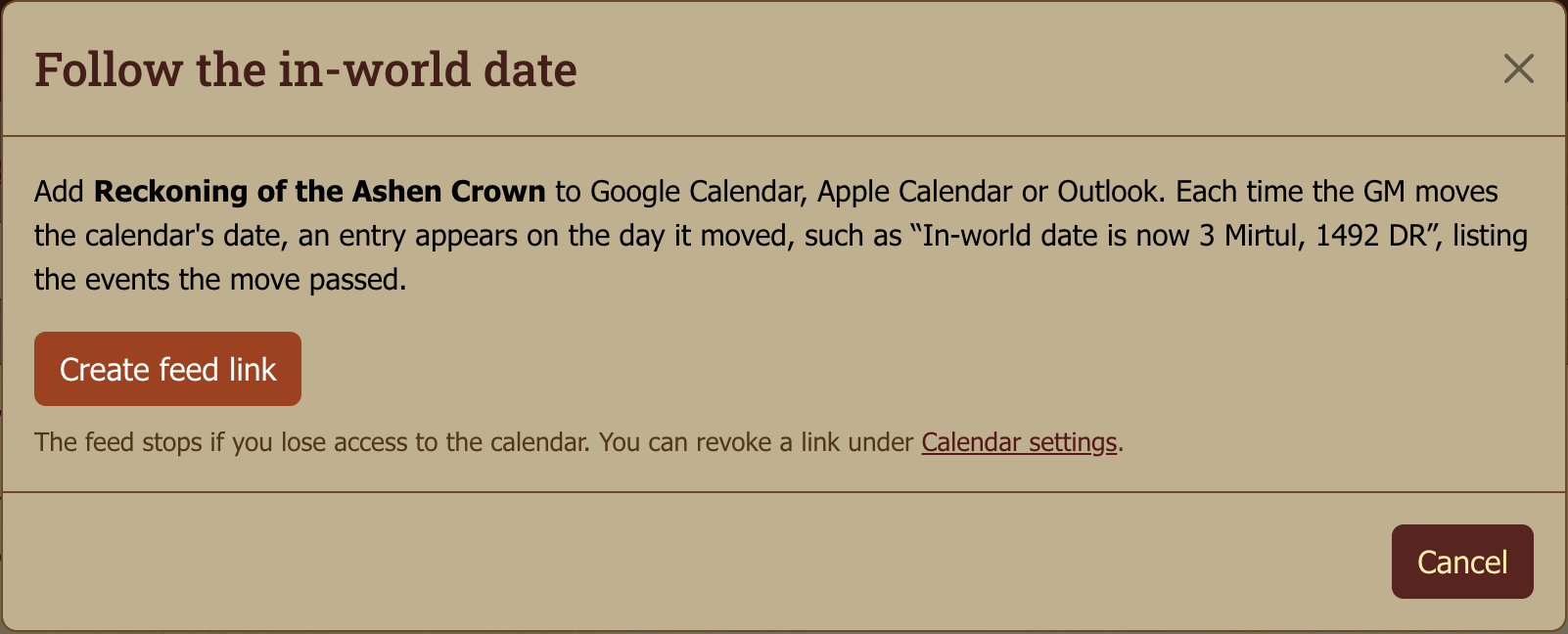
Anyone who can read a campaign calendar can follow its in-world date from Google Calendar, Apple Calendar or Outlook. Choose Subscribe in the calendar header, then Create feed link, and add the link to your calendar app as a subscription.
In-world dates don't fall on real days, so the feed doesn't place events on your real calendar. Instead, each time the GM moves today, an entry appears on the real day it moved, such as "In-world date is now 3 Mirtul, 1492 DR". The entry lists the events the move passed over, up to 20. Only event titles appear, never notes, and only events you can see on the calendar.
The link is shown once, so copy it straight away. You can revoke it under Calendar → Settings. The feed stops working if you lose access to the calendar, for example when you leave the game.
Year titles
[GM]
Each year can have a title — a custom label that appears alongside the year number. Common in fantasy settings:
1368 DR — The Year of the Banner
1369 DR — The Year of the Gauntlet
Add them from the calendar's edit screen, and they'll appear in your year and decade views and on event details.
Eras
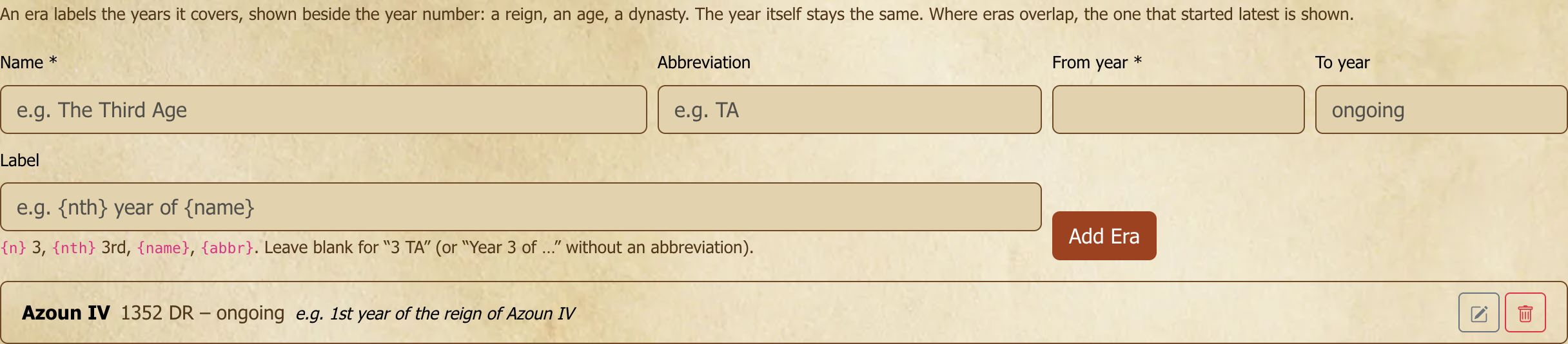
An era labels the years it covers: a reign, an age, a dynasty. The label appears beside the year number in the calendar header, on the "today" marker and in the summary views, so 1372 DR can read 1372 DR · 21st year of the reign of Azoun IV. The year itself stays the same.
[GM]
Add eras in the calendar's Settings, on the Eras tab. Give each one a name, the year it starts, and optionally the year it ends and an abbreviation. The Label says how a year inside the era reads, using {n} (3), {nth} (3rd), {name} and {abbr}: for example {nth} year of the reign of {name}. Left blank, a year reads like 3 AR (with an abbreviation) or Year 3 of the Dale. Where eras overlap, the one that started most recently labels the year.
Events
This is where your timeline comes alive. Each event has the following fields:
- Title — what the event is
- Date — the in-world date (year, month, day)
- Optional duration — for multi-day events ("the Festival of Lights, 14–17 Hammer")
- Description — the lore, the prep notes, whoever's hosting
- Repeats — optional. Every year for a holiday, or every full moon or every new moon of one of the calendar's moons. A moon event starts on its date and appears on each new or full moon after it, in month view.
- Event tags — optional words such as war, holy day or the vault, separated by commas. Tags already used on the calendar are suggested as you type.
- Color — optional. Color-code events on the calendar (e.g. by faction, region, or theme); colored events render in that color on the grid, the day list and the summary views. Leave it on None for the default style. If the calendar has a color legend, each swatch is named by its meaning.
Events appear marked on the date in month view, listed in summary views, and are searchable within the calendar. A multi-day event shows as a bar across every day it covers, including into the next month or year. Its name appears where it starts and again at the start of each week row. Clicking a day lists the event with its full date range. An event that has a Description shows a small notes icon on its calendar entry, so you can tell at a glance which dates carry extra detail. (If the description is GM-only via a private block, players don't see the icon, it just reflects what each viewer can actually read.)
Who can add events. GMs add events by default. A GM can let all members add them too (see Access control). If you can, the calendar shows Add Event, and you can edit or delete the events you added. Other people's events open read-only.
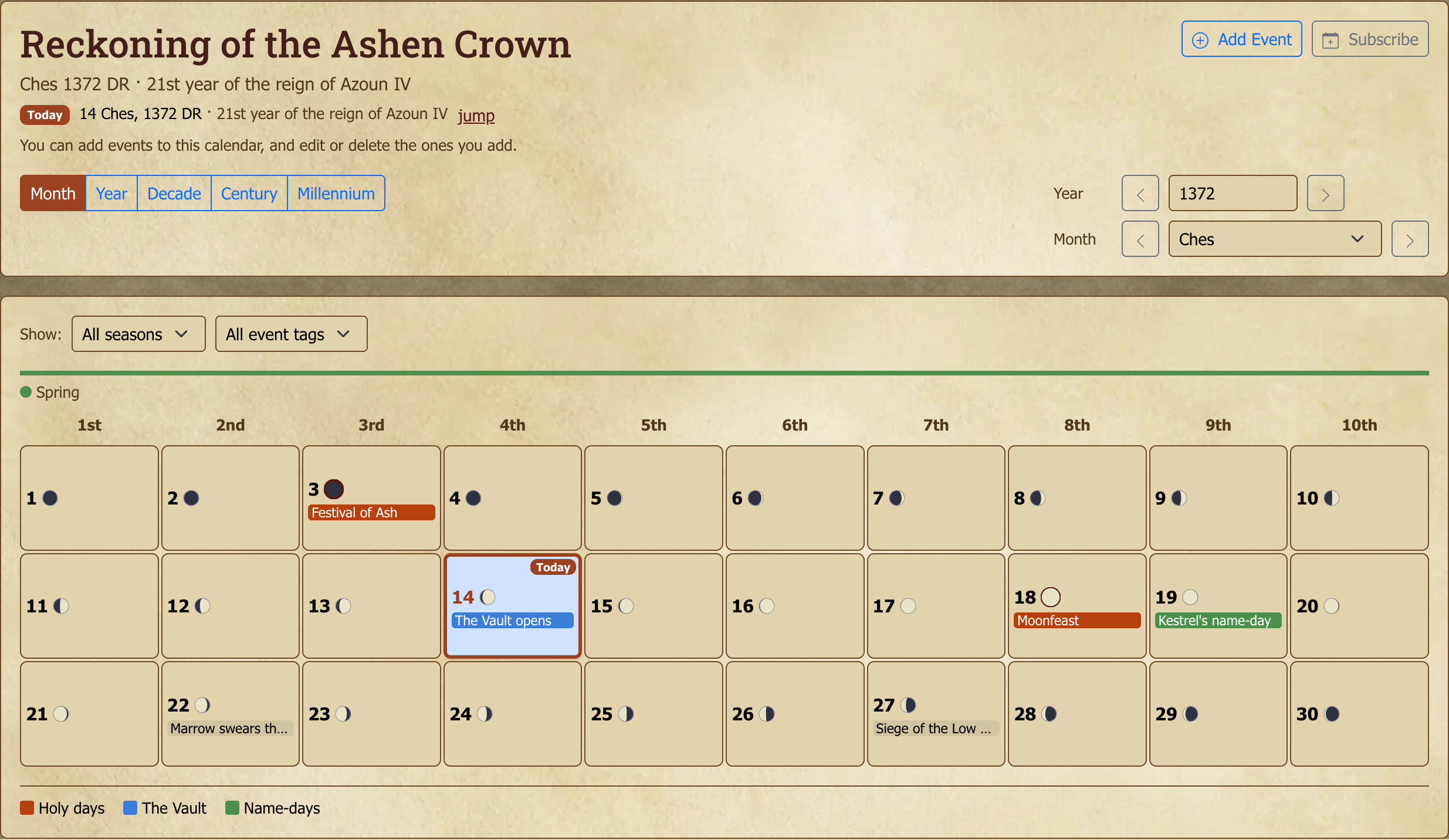
Filtering. When a calendar's events have tags, or the calendar has seasons, a Show bar above the grid filters what you see: pick a season, an event tag, or both. Clear filters shows everything again. The filter is part of the page address, so a filtered view can be shared as a link.
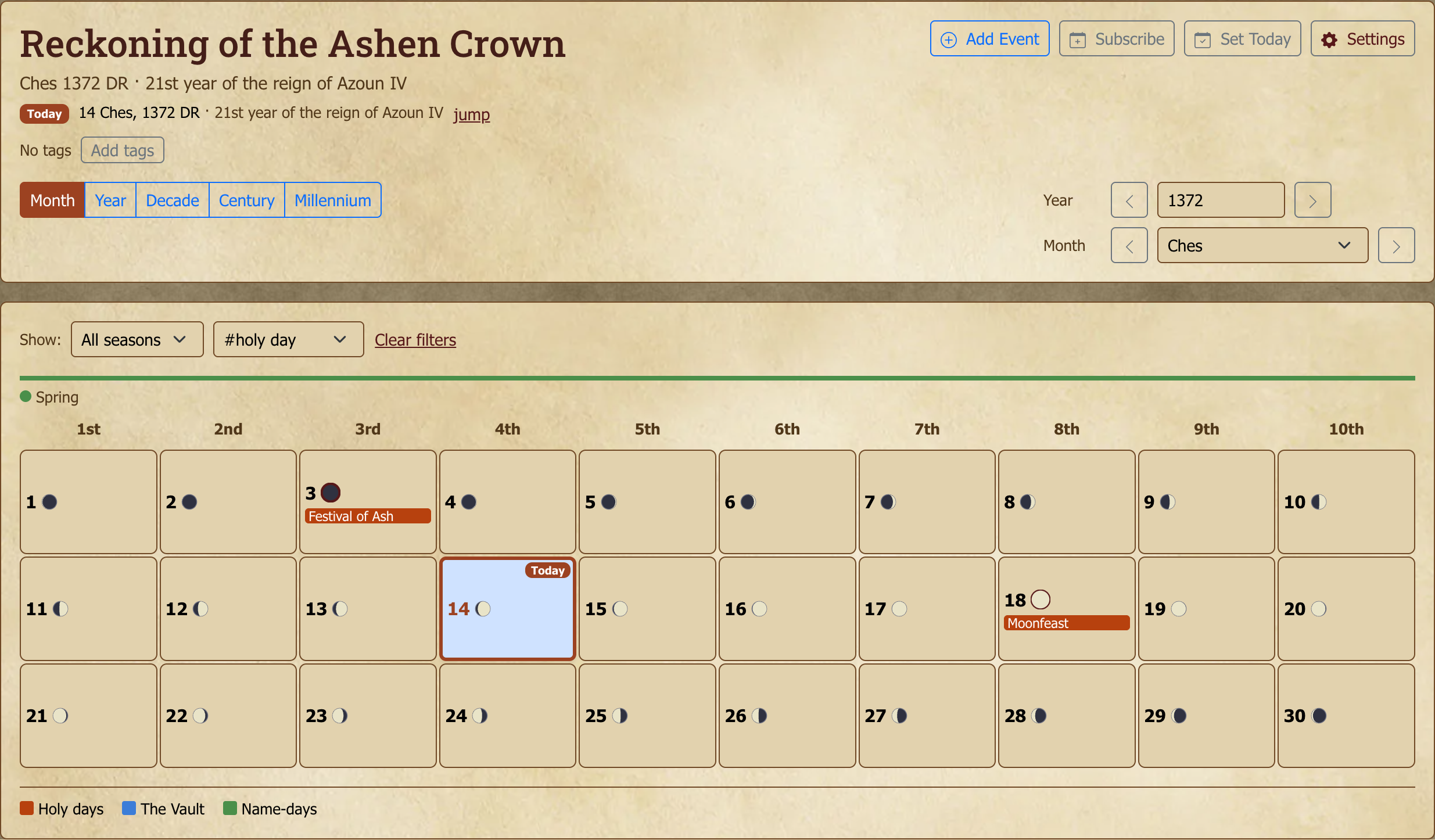
Multiple events on one day are fully supported. Click a specific event in the grid to open it directly, or click elsewhere on the day to get a list of everything on that day. Then, pick any one to view or edit it, or add another event to the same day. (The month grid shows the first few per day, then a "+N more" count; the day list always shows them all.)
Under the hood: where events live
Calendar events live on the calendar resource itself rather than on any one game, which has a useful side effect: you can link the same calendar to several games. A shared world played by different tables stays perfectly in sync, with the same events showing up for everyone. A GM of any of those games counts as a GM of the calendar's events, so they see private notes the way they do in their own game. And because the calendar stands on its own, deleting a game leaves its campaign calendar intact unless you delete the resource too.
Color legend
[GM]
Give each event color a meaning so everyone reads the calendar the same way: red for "Zhentarim", green for "Holy day", and so on. Set it in the calendar's Settings under Color Legend, which lists every event color with a box for its meaning. Leave a box blank to leave that color out. A meaning can be up to 60 characters.
Once a GM has labelled at least one color, a key appears under the calendar in every view, showing only the labelled colors. Hovering over a colored event in the month grid shows its meaning next to its title. The legend is part of the calendar, so anyone who can read the calendar can see it.
Access control
[GM]
The calendar has its own read and write access settings, separate from the parent game's:
- Read — usually all game members; can be narrowed if the calendar reveals plot
- Write — usually GMs only; assistant GMs can be granted write to delegate calendar curation
- Who can add events — usually GMs only. Set it to All members to let players add events too. Each player can then edit or delete only the events they added; anyone with write access can still edit everyone's, as well as the calendar itself and its year titles. A player's event is visible to whoever can read the calendar.
This means a calendar can be more open or more restricted than the game itself — useful for "GMs maintain the canonical timeline, players consult."
Calendars use the same visibility options as every other resource, including the linking rule — see Resource visibility. Note that Public here means any signed-in member of the site, not logged-out visitors; nothing on Myth-Weavers is readable without an account.
Ownership. The calendar's owner can hand it to another member: in Settings, under Transfer ownership, search for them and choose Transfer. Its events, eras and game links stay as they are. Only the owner (or a site admin) can transfer or delete a calendar. A GM of a linked game can edit it if its write access allows, but can't take it away from the other games that use it.


Next steps
- Characters, Resources, and Maps — the broader resource-tab overview, including Pages, Blogs, and Maps.
- Calendar, Events, and Notifications — the real-world calendar, for session scheduling and out-of-character events.
- Game Master's Guide — full GM reference, including resource management.