
Dice Rolling
Myth-Weavers has a built-in dice roller wired directly into the posting experience. Rolls are server-side, timestamped, and tamper-proof. This makes it easy for GMs and players alike to keep track of previous rolls and combat in the play-by-post style.
The dice roller is designed to mimic the real table. You roll dice while crafting your post rather than having to wait for the post to save to see the results. Rolls are immediately permanent parts of the topic's timeline; they can't be hidden from the GM or other players (though hidden rolls can be later revealed). No cheating!
How to roll
In any topic, open the Dice Roller panel. Standard dice notation:
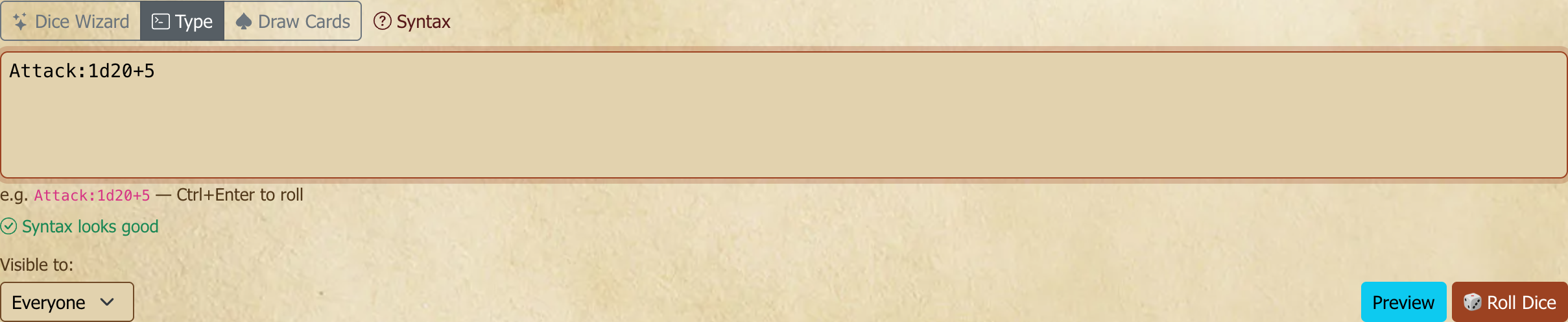
1d20— one twenty-sided die2d6+3— two d6, sum, add 31d20+1d6— combine dice anywhere a number can gokeep(4d6,highest,3)— four d6, keep the highest three (the classic D&D ability score)Attack Roll:1d20+5— put a label before a colon so you (and everyone else) remember what the roll was forInit:1d20+4;1d6— separate multiple expressions under one label with a semicolon
Type, click Roll, or use ⌘/Ctrl+Enter for the keyboard shortcut. Not sure of the syntax? The ? Syntax button on the dice panel opens a quick reference.
Rolling the same thing again? Recent, next to Syntax, lists the last 25 rolls you made in this game, newest first: dice, card draws, table rolls and symbol-dice pools. Pick one and it's queued again, label and all. It only ever shows what you typed, never a result, so a blind roll stays blind.
The Roll inline dice dialog in the post editor has a Recent button too. An inline roll is a single dice roll, so there it lists only your dice expressions. Picking one fills in the box; nothing is rolled until you click Roll.
A single roll line is capped at 200 dice (counting any rerolls or exploding dice it generates) — well beyond any normal roll. If you exceed it, the roll is rejected with a "maximum of 200 dice" message and nothing is posted; split it into smaller rolls.
Notation in detail
The standard formula is [number]d[sides][operation][modifier] — 1d20+3 rolls one d20 and adds 3.
- Arithmetic: add, subtract, multiply, and divide —
2d6+3,1d8-1,1d6*2,2d10/2. - Combine dice anywhere a number can go —
1d6+1d8,1d10*1d10,1d6*1d6+3+1d10. - Labels go before a colon and are required in the panel —
Attack:1d20+5. - Multiple expressions under one label, separated by semicolons —
Attack:1d20+4;1d6+2rolls both and reports each result.
Functions
More complex rolls use function-call syntax: the function name wraps the dice in parentheses, e.g. keep(4d6,highest,3). Two rules apply throughout:
- A flat modifier goes after the closing parenthesis, not inside —
keep(2d20,highest)+3works, butkeep(2d20+3,highest)errors (the first argument must be dice, not an expression). - Functions nest — the dice argument can itself be a function, e.g.
drop(reroll(4d6,1,below),lowest).
Throughout, order is highest or lowest and direction is above, below, or both.
keep / drop
keep(dice, order, number) rolls the dice and keeps the number highest or lowest; drop(dice, order, number) discards them instead. Omit number and one die is kept/dropped. keep and drop are inverses — keep-highest-3 of 4d6 equals drop-lowest-1.
keep(4d6,highest,3)— the classic D&D ability score (keep the best 3 of 4d6)keep(2d20,highest)/keep(2d20,lowest)— D&D 5e advantage / disadvantage
sort
sort(dice, order) returns the rolled dice sorted highest-to-lowest or lowest-to-highest — sort(4d6,highest).
reroll
reroll(dice, threshold, direction, count, budget) rerolls any die at or beyond the threshold. With below, dice at or under the threshold are rerolled; with above, dice at or over it. count caps how many times each die is rerolled — omit it (or use 0) for unlimited. Default direction is below.
budget caps the rerolls for the whole roll rather than each die. Every qualifying die gets one reroll before any die gets a second, so a budget of 2 rerolls two different 1s if you rolled two, or the same die twice if you rolled only one. Whatever is left when the budget runs out is kept.
reroll(6d6,3)— reroll any 1, 2, or 3 until it comes up 4 or higherreroll(4d6,1,below,1)— reroll 1s, but only once each (keep the second result even if it's another 1)keep(reroll(6d6,1,below,0,2),highest,4)+2— reroll up to two 1s in total, then keep the best four and add 2 (A Song of Ice and Fire's Attractive)
explode
explode(dice, threshold, count) — for each die at or above the threshold, roll an extra die; if that one also reaches the threshold it explodes again. count limits the chain (omit or 0 for unlimited) — explode(3d6,6).
success / failure
success(dice, threshold, direction, cancel, bonus) counts how many dice meet the criteria. above counts dice at or over the threshold; below, at or under it. Set cancel to yes to let each 1 cancel a success, and bonus to yes to add a success for each maximum die rolled. Both default to no.
success(5d10,8,above)— count dice that rolled 8 or highersuccess(explode(5d10,10),8,above,no,no)— New World of Darkness pool (10s explode, 8+ are successes)
failure(dice, threshold) counts dice at or below the threshold — the same as success(dice, threshold, below).
repeat
repeat(expression, count) runs the whole expression count times and returns a list of results. Because the result is a list, you can't add to it at the top level — put any modifier inside: write repeat(keep(4d6,highest,3)+4,6), not repeat(keep(4d6,highest,3),6)+4.
repeat(3d6,6)— roll 3d6 six times (D&D ability scores)repeat(drop(4d6,lowest),6)— 4d6-drop-lowest, six times
min / max
max(value, value, …) gives the highest of two or more values and min(value, value, …) the lowest. A value can be a number, dice (their total), or a repeat list (every result in it). The dice still appear in the roll, so everyone sees what was actually rolled.
max(1d20,10)— a d20 that counts as at least 10 (D&D 5e's Reliable Talent and similar minimums)max(2d8+4,13)— roll monster hit points, but never below the averagemin(1d20,1d20)— the lower of two d20smax(repeat(1d20,3))— the best of three d20s
round
round(value) rounds to the nearest whole number, with halves rounding away from zero (2.5 becomes 3, and −2.5 becomes −3). Division can leave a fraction, so round goes around it: round(3d6/2) halves a 3d6 roll to the nearest point. To always round down or up instead, use floor(…) or ceil(…).
stress
stress(dice, success, disaster, base) counts successes (dice at or over success) and disasters (dice at or under disaster, 1 if you leave it out) on the same roll, and reports both. Optional base dice count toward successes but never as disasters — so a whole roll that mixes ordinary dice and stress dice is one line.
stress(2d6,6,1)— two stress dice: 6s succeed, 1s are disastersstress(2d6,6,1,3d6)— The Walking Dead: three base dice and two stress dice; a 1 on a base die doesn't count
Game systems
Several systems have dedicated roll functions:
If you'd rather not type them, every system below also has a form under Wizard in the Random tab. Pick it from System, fill in the boxes, and press Add Roll. The Wizard's Standard form can also build round, max (as at least), min (as at most) and a reroll's total budget.
age(modifier, target)— Adventure Game Engine. Rolls 2d6 plus a stunt d6, adds the modifier, and compares to the target if one is given. Doubles trigger a[STUNT: x]result.arsmagica(modifier)/arsmagica(modifier, botches)— Ars Magica. The plain form rolls 1d10 + modifier (a 10 counts as 10). Add a botch-dice count for the stress mechanic: a 10 becomes 0 and rolls that many botch dice (a 0 on any is a botch); a 1 explodes, doubling the multiplier for each consecutive 1.fate(modifier)— Fate / Fudge. Rolls 4dF and adds the modifier; usefate(0)for no modifier.genesys(ability, proficiency, boost, difficulty, challenge, setback, success, advantage, triumph, failure, threat, despair)— Genesys narrative dice (outputs symbol dice).l5r(ring, skill)— Legend of the Five Rings 5e (outputs symbol dice).ore(pool, hard, wiggle, expert…)— One-Roll Engine. Counts of pool, hard, and wiggle dice; add as many expert-die values as you need, comma-separated.rollandkeep(rolled, kept, explode, raises, free, target)— Roll & Keep (7th Sea, older L5R).rolledandkeptare d10 counts;explode(yes/no) re-rolls 10s into the pool;raisesraise the target in +5 steps;freeadds +5 bonuses;targetis the difficulty to meet or beat.tor(sixes, weary, favor)— The One Ring. Rolls that many d6 plus a d12 (2d12 keep-highest withfavor, keep-lowest withill).wearyset toyeszeroes d6 results under 4. On the d12, the Eye of Sauron is 0 and the Gandalf rune is an automatic 10.ffgsw(ability, proficiency, boost, difficulty, challenge, setback, force, success, advantage, triumph, failure, threat, despair, light, dark)— Fantasy Flight Games Star Wars narrative dice.savage(trait, wild, modifier, tn)— Savage Worlds trait roll. Rolls the trait die and a Wild Die (defaults to a d6); both "ace" (a maximum face re-rolls and adds, repeating), and the higher total is kept. Adds the modifier and compares to the target number (defaults to4); every full4over the target is a raise. A natural1on both dice is a critical failure. Setwildto0for an Extra (no Wild Die — then a natural1on the lone die is the critical failure). Example:savage(8,6,2,4)rolls a d8 trait + d6 Wild, +2, vs TN 4.savagedmg(count, size, modifier, toughness)— Savage Worlds damage. Rolls the damage dice, which all ace, and sums them plus the modifier (no Wild Die). Add atoughnessto compare: meeting or beating it isShaken, and every4over it is a wound. Example:savagedmg(2,6,1,7)rolls 2d6 (acing), +1, vs Toughness 7.savagedmg(damage, modifier, toughness)— the same roll when the dice are not all the same size, which the form above cannot express. Put the whole damage expression in the first field:savagedmg(1d10+1d4,0,7)is a monster's d10 Strength plus d4 claws against Toughness 7. Every die still aces, each at its own size — the d4 explodes on a 4, the d10 on a 10 — and the modifier and Toughness apply to the combined total. A flat bonus can go in the expression too:savagedmg(1d10+2).One rule worth knowing: a plain number in the first field always means a count of dice, never an expression that happens to equal that number.
savagedmg(2,6)is two d6, exactly as it always was — to roll a single d6 as an expression, writesavagedmg(1d6).trophy(light, dark)— Trophy Dark / Trophy Gold. Rolls that many light and dark d6 and lists each group separately — never summed, because the game reads the faces. Example:trophy(2,1)→ Light [2,4] · Dark [3].vtm(pool, difficulty, specialty)— Vampire: the Masquerade (20th Anniversary). Rolls a pool of d10; each die at or over the difficulty (default 6) is a success, and each 1 cancels one success. Setspecialtytoyeswhen the roll uses one of your specialties, and every 10 counts as two successes. No successes rolled and at least one 1 is a botch. Examples:vtm(5,7),vtm(5,6,yes).wfrp(tn, attack)— Warhammer Fantasy Roleplay. Rolls d100 against the target number; you succeed by rolling at or under it, and the degrees of success are counted in tens (e.g. TN 60, roll 20 → 5). Setattacktoyesto also reverse the roll's digits for a hit location (Head / Left Arm / Right Arm / Body / Left Leg / Right Leg) and flag doubles as a critical. Example:wfrp(60)for a skill test,wfrp(60,yes)for an attack.
Common rolls
Paste these straight into the panel (rename the label before the colon to taste):
- Ability scores (3d6 ×6):
Ability Scores:repeat(3d6,6) - Ability scores (4d6 drop lowest ×6):
Ability Scores:repeat(drop(4d6,lowest),6) - Ability scores (4d6, reroll 1s, drop lowest ×6):
Ability Scores:repeat(drop(reroll(4d6,1,below),lowest),6) - Attack and damage:
Attack and Damage:1d20+5;1d6+2 - D20 with advantage:
Attack with Advantage:keep(2d20,highest)+3 - D20 with disadvantage:
Attack with Disadvantage:keep(2d20,lowest)+3 - New World of Darkness pool:
Strength + Athletics:success(explode(5d10,10),8,above,no,no) - Savage Worlds trait roll (d8 + Wild d6 vs TN 4):
Fighting:savage(8) - Savage Worlds damage:
Damage:savagedmg(2,6)— orClaws:savagedmg(1d10+1d4,0,7)for mixed dice - Warhammer skill test (TN 60):
Skill Test:wfrp(60)
Visibility
Decide who sees the result before you roll:
- Everyone (default) — the roll and result are visible to all topic readers.
- GM Only — only you and the GM(s) see the roll and the result. GM-rolled GM-only rolls are invisible to all players. Useful for random encounters, secret events, and the like.
- Blind — you see that you rolled but not the result; only the GM(s) see the actual number. Useful for perception checks, saves, anything where the player should be in the dark.
The pending-and-claim flow
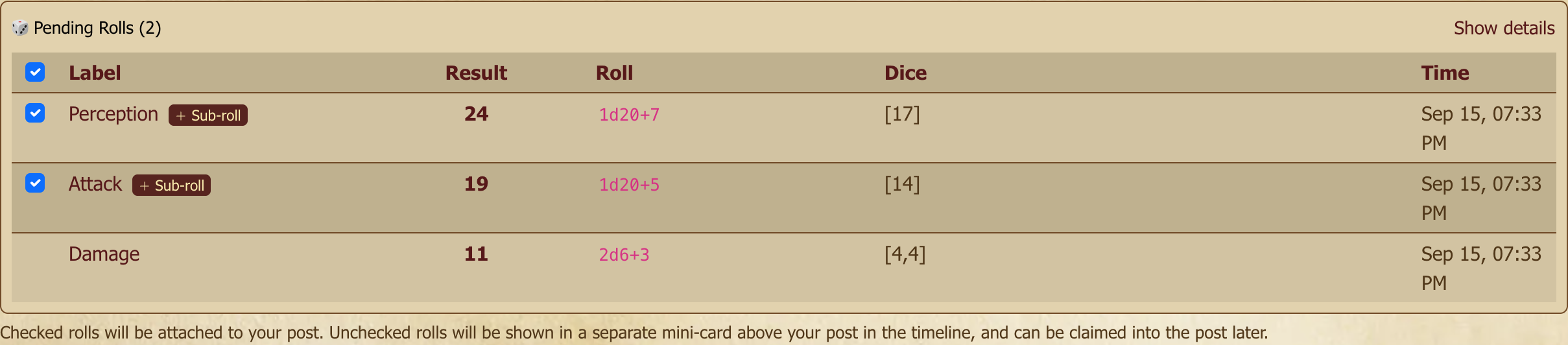
After rolling, the result sits in your Pending Rolls panel. Pending rolls aren't attached to any post yet — they're staged.
This is the core dice mechanic: roll first, then write the post and claim the rolls you want to attach. The rolls appear inline in the timeline, timestamped to when they were originally rolled, not when you claimed them. That way the correct rolls show up when that action was taken, so the GM can see exactly when something was rolled.
Why pending-and-claim matters
PBP runs on trust, but pure trust scales badly across years and dozens of players. The pending-and-claim model makes the trust mechanical: every roll is permanently recorded and timestamped at the moment of rolling, not the moment of claiming. A GM can see that someone rolled six times in a topic and claimed two — visible, not necessarily punishable, but a basis for a conversation if the pattern matters. Most players never need to think about it; it's there for the rare case where it does.
In the timeline
Claimed rolls show up inline in the topic, in chronological order. Each displays:
- Who rolled and when
- The dice expression and label
- Individual die results and the total
- A visibility indicator if the roll is GM-only or blind
A roll you place inside the text of your post works the same way. If the roll is GM-only, blind or a whisper, a small GM only, Blind or Whisper tag appears beside it. You can see your own GM-only result, and the tag tells you the other players can't.
To cross out a roll inside your post — say, one you rerolled with a character ability — click it in the editor and tick Strikethrough. The line through it is only a marker: the roll itself and its result stay exactly as they were rolled.

[GM]
Adding a roll a player forgot. If a player wrote their post but forgot to claim the roll, you don't have to make them redo it. Roll the dice yourself in that topic's dice panel — the result lands in the timeline as an unclaimed roll. On that roll's card, Claim into player's post above attaches it to the post directly above (the buttons name whose post they target, so you always know where it's going). Because you're a GM you can claim into any member's post in your game, not just your own.
Undoing a claim. Claimed the roll into the wrong post? Open the roll's Show details (in the roll panel under the post) and use Detach from post. The roll pops back out to the timeline at its original spot, ready to claim again. Anyone who can edit the post can detach a roll from it.
Drawing cards
Some games want cards rather than dice — Savage Worlds initiative, a tarot spread, a Deck of Many Things, a homebrew oracle. The Cards mode of the Random tab draws them, and the result lands in the timeline exactly like a roll: same claiming, same visibility options, same permanence.
Pick a deck, choose how many cards, and press Add Draw. The draw joins whatever else you have queued — you can queue two dice rolls and a card draw and commit them together, in order.
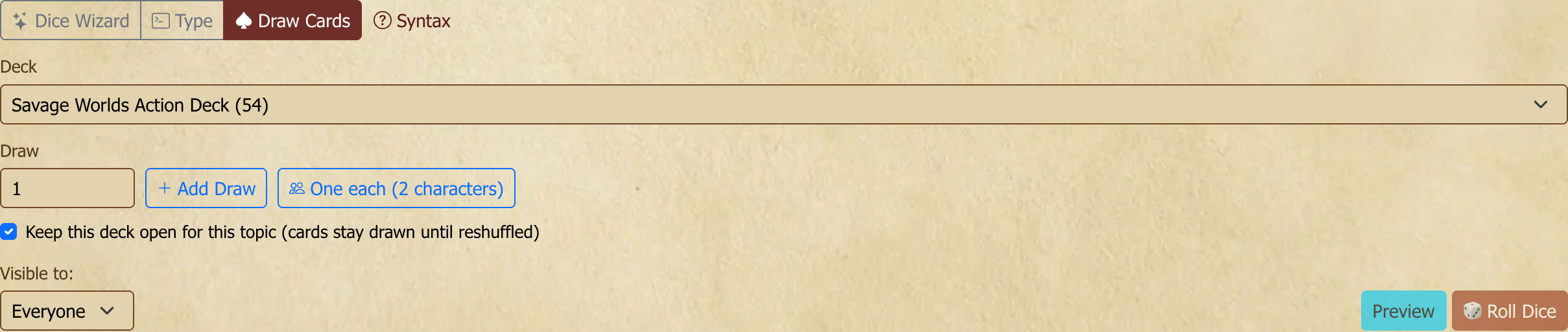
One each deals a separate card to everyone at the table in one click — the button shows the count, so for a four-player game it reads One each (4 players). Each draw is its own row, labelled with who it's for, so the result reads as an initiative order rather than an anonymous handful of cards. If the deck is set to stay open, all of them come from the same deck, so nobody can be dealt the same card twice.
[GM]
When your players have characters linked to the game, One each deals one card per character, labelled with the character's name — so a player running two PCs gets two cards. Your own characters aren't dealt in (add a draw by hand for NPCs), and neither are characters of players who have left the game. With no characters linked, it deals one per player as above.
You can also type a draw instead of using the picker. The Type tab takes card lines alongside dice, one per line:
Attack:1d20+5
Initiative:draw 1 from @blackrock-initiative
Preview only covers the dice — a card draw has no preview, because drawing a card really does take it out of the deck.
Every game can use the standard decks: a 52-card deck, one with jokers, a full tarot deck, a tarot deck of just the 22 major arcana, the Savage Worlds action deck, and a Savage Worlds deck with four jokers instead of two. A GM can add decks of their own; see below. Community-forum topics can draw from the standard decks too — game decks and open decks need a game.

Decks that stay open
By default each draw is independent: the deck is shuffled fresh, so drawing three cards twice in a row can give you the same card twice. That matches how dice work, and it's what you want for a tarot reading or a one-off omen.
For initiative, you want the opposite — a deck that remembers what's already been dealt. Tick Keep this deck open for this topic when you draw, and the deck stays open: subsequent draws come from what's left, and the panel shows how many cards remain.
An open deck belongs to the topic it was opened in, so two simultaneous combats in two threads each get their own without anyone having to think about it. You can have several open at once in the same topic.
Decks stay open inside a game. In the community forums there is no game to hold one, so draws there are always independent — you get the standard decks and a fresh shuffle every time, and no "keep this deck open" option.
[GM]
Reshuffling and closing. With an open deck selected, you get two extra buttons. Reshuffle returns every card and starts a fresh shuffle — that's the one you want when Savage Worlds tells you to reshuffle at the end of a round in which a Joker was dealt. Close stops any further drawing.
Neither one touches history. Draws already made stay in the topic, exactly as they were, forever — closing a deck, deleting a deck, or editing one never changes a card that was already dealt.
Why deleting a draw doesn't put the card back. If you delete a card draw, the card stays spent. Returning it would let a card that players have already seen come back around, which is the card equivalent of quietly rerolling. If you need cards back, reshuffle — it's visible to everyone, which is the point.
A note on the count. The "cards left" number is worked out per person. A GM-only draw doesn't move it for the players, because otherwise the number would give away that a hidden draw happened. Your count is the true one; theirs may read high.
Making your own decks
[GM]
Manage Game → Decks & Tables is where a game's own decks live. Write one card per line:
A♠  Ace of Spades
🐉  Ancient Dragon | A wyrm of the old world
The Fool
Start a line with an emoji or symbol followed by two spaces to give the card a face; anything after a | is a description. Card images beyond emoji aren't supported yet.
Editing a deck never disturbs a game in progress — a deck already open in a topic keeps playing with the cards it was opened with.
Range tables
Some games read a roll against a chart instead of using the number directly. Godbound's damage chart turns a 1 into 0 damage, 2–5 into 1, 6–9 into 2 and 10 or more into 4. Powered by the Apocalypse games turn 6 or less into a miss, 7–9 into a partial success and 10+ into a full success. A range table does that reading for you: roll it, and the result shows the total and the outcome.
To roll one, pick Table in the Random tab, choose the table, and press Add Roll. It joins whatever else you have queued, just like dice and cards. You can leave Dice empty to use the table's own dice, or roll something else against it, such as Godbound's d8 Fray Die against the same damage chart. Add a Modifier for things like a PbtA stat bonus.
You can also type a table roll in the Type box. Write the table's name in lower case with hyphens for spaces, so a table called "Godbound damage" is godbound-damage:
Damage:roll godbound-damageuses the table's own diceMove:roll pbta-moves +2adds a modifierFray:roll godbound-damage with 1d8rolls different dice against it
If a roll lands off the chart, for example a modifier pushes it past the last line, the result says no outcome and shows the total. It never guesses the nearest line.
[GM]
Manage Game → Decks & Tables has a Range tables list. Give the table a name and its usual dice, then write the ranges the way the rulebook does, one per line:
1 = 0
2-5 = 1
6-9 = 2
10+ = 4
3 = … is a single number, 2-5 = … a span, 10+ = … "10 or more" and 6- = … "6 or less". The outcome can be a number or words (7-9 = partial success).
Saving checks the table. Every roll of the table's dice has to land on exactly one line, so a gap (nothing covers a 5) or an overlap (a 5 matches two lines) is refused. The editor lists every problem at once, with its line. A line the table's own dice can never reach is allowed, with a note, because other dice may be rolled against it.
Rolling on another table. A line can send the roll on to a second table: 10 = roll Rare loot. The second table rolls its own dice, and the result shows each step, e.g. [10] = 10 → Rare loot: [4] = 4 → a gem. A roll can pass through at most three tables. Saving refuses a name that matches no table, a name that both your game and the site-wide tables use, and anything that would loop back on itself. If you rename "Rare loot", tables that roll on it update to the new name automatically. If you delete it, those lines roll as table removed until you fix them. To use the words "roll again" as an outcome, put them in quotes: 7-9 = "roll again".
Symbol dice
Narrative systems roll dice whose faces show symbols instead of numbers — successes, advantages, threats — and a roll is a pool of several kinds of die at once. The built-in genesys(…) and ffgsw(…) cover those two games. For any other system, a GM can make the dice.
To roll, pick Symbols in the Random tab, enter how many of each die you want (say 2 Ability and 1 Difficulty), and press Add Roll. The whole pool is one roll: the result shows every face that came up, then the net total, e.g. Ability: success, blank · Difficulty: failure → nothing (all cancelled). You can also type it, naming each die the same way as a typed table: Check:pool 2 ability + 1 difficulty.
[GM]
Manage Game → Decks & Tables has a Symbol dice list. Write the die one face per line:
blank
success
2 success
success, advantage
advantage
opposites: success / failure, advantage / threat
Separate symbols on a face with commas, put a number in front for more than one, and write blank for an empty face. Six lines make a six-sided die.
The opposites: line names symbols that cancel each other, one for one, when the pool is rolled: 3 successes and 1 failure net to 2 successes. A pair declared by any die in the pool applies to the whole pool, so the Difficulty die doesn't need to repeat what the Ability die says.
Dice jail
Some rolls deserve punishment. Open a roll's Show details and choose Put in dice jail: the roll gets a small jailed mark that everyone who can see it sees. It's purely a mark, so the result, where it's claimed and who can see it all stay exactly as they were. Free from dice jail takes the mark off again.
Only the person who rolled can jail their own roll; a GM can't jail yours.
Roll history
Every roll is permanently recorded. The full roll history for a topic shows every roll ever made there — who, what, the results, the visibility. Useful for the rare audit and for the always-interesting "wait, when did Jen's character last crit?" stats.
Next steps
Your character probably needs a home. Characters, Resources, and Maps covers sheet linking, wiki pages, and the rest.